Best Claude Code Skills for Web Design: I Counted 259 Calls
Claude Code skills are instruction folders Claude loads when a task matches their description. In “Best Claude Code Skills for Web Design: I Counted 259 Calls”, Pavlo Zhydkykh counts which skills Claude really called on four months of client website work, and which popular installed skills Claude never used.

Pavlo ZhydkykhUpdated · 8 min read
Short answer
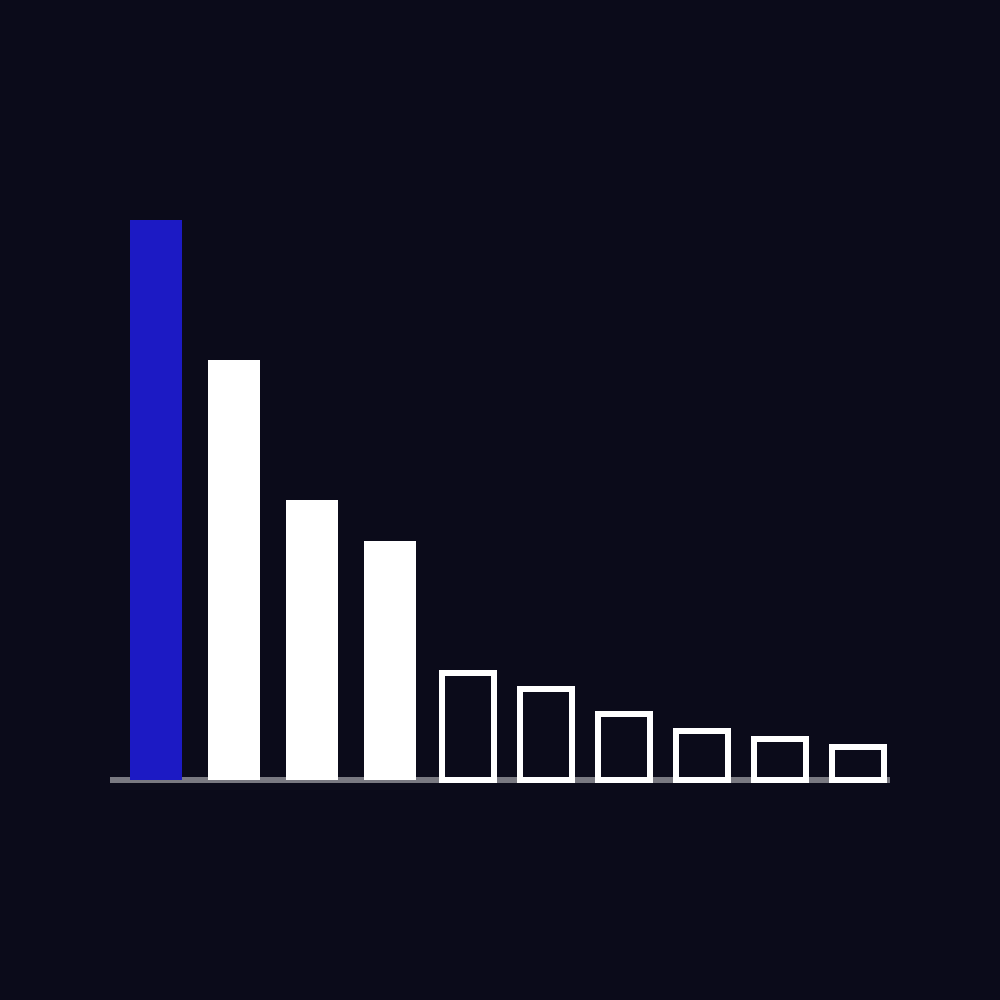
Claude Code skills are folders of instructions that Claude loads when a task matches their description. I build client websites with Claude Code every day, so I counted which skills it actually called from July to November 2026: 259 calls, 29 skills. Four of them did 70% of the work, and some of the most installed design skills were never called once.
Key takeaways
- From 9 July to 17 November 2026 Claude called 29 different skills 259 times in Pavlo Zhydkykh’s web design sessions.
- Four skills made 182 of the 259 calls: design research, a staged design pipeline, a writing check and an isometric figure skill.
- The official frontend-design plugin, enabled since 21 October 2026, was never called in four weeks.
- Claude Code preloads only the name and description of every installed skill, so the description decides whether a skill is used.[3]
- When the skill listing overflows its budget, Claude Code drops the descriptions of the least used skills first.[2]
What is a Claude Code skill?
A Claude Code skill is a folder with a SKILL.md file of instructions, and sometimes scripts and reference files, that extends what Claude can do. Claude sees the name and description of every installed skill and loads the full instructions only when a task matches or when the user types /skill-name.
“Installing a skill is not using the skill. Count the calls after a month, and rewrite or remove every skill that sits at zero.”
Last checked · 8 min read
How I counted: 259 skill calls in four months
Every Claude Code session leaves a transcript on disk, and every time Claude loads a skill, the transcript records a call to its Skill tool with the skill's name. I wrote a short script that reads all the transcripts still on my Mac, about 1,400 files from 9 July to 17 November 2026, and counts those calls by skill, by session and by date.
The work behind them is ordinary studio work: client websites on Framer and Astro, Figma screens, my own site rebuilt on Astro, blog covers, emails and posts. I have 58 skills in my personal skills folder plus several plugins, so Claude always had far more skills available than it used. The Figma side of that work has its own count: how I use Figma MCP with Claude Code.
One limit: the count shows what Claude loaded, not whether the skill made the result better. Where I can measure the result, I say so below.
The Claude Code skills Claude actually called
These are the ten skills with the most calls. Sessions means the number of separate chats in which Claude loaded the skill at least once.
| Skill | What it does | Calls | Sessions |
|---|---|---|---|
| refero-design | Design research: pulls real reference sites, screens and flows before anything is drawn | 68 | 16 |
| design-forge | A staged design pipeline with my approval between stages | 51 | 13 |
| human-check | My own skill: checks every client text for signs of AI writing | 34 | 18 |
| anatomy | Detailed isometric SVG figures that explain how something works | 29 | 7 |
| framer-code-components | Framer's rules for code components on client sites | 13 | 12 |
| figma-use | Figma's skill for drawing into a file through its plugin API | 11 | 8 |
| framer | Editing and publishing Framer projects | 8 | 5 |
| claude-api | Anthropic API reference for small tools I build | 6 | 2 |
| seo-audit (claude-seo) | A full SEO audit of a site | 5 | 1 |
| figma-generate-design | Turning a page or layout into a Figma screen | 4 | 4 |
| 19 other skills | Lottie, PDF, dataviz, GIFs and one-off setup tasks | 30 |
The top four made 182 of 259 calls, 70%. Everything below them is a specialist that comes out for one kind of job, which is how it should be.
Why four skills did most of the work
- refero-design runs before any new design. It pulls real sites and app screens as references and writes down what to take from each before Claude draws a single frame. It replaced my habit of describing a "clean, modern" look and getting the average of the internet back.
- design-forge was my main pipeline from July to October: discovery, design system, research, then screens, with a stop for my approval at each gate. Its calls end on 30 October 2026, when I moved new design work to research first and Figma first.
- human-check is the one I wrote myself, from Wikipedia's "Signs of AI writing" list. Claude runs it on every email, proposal, post and article before I see it. It has the most sessions of any skill, 18, because text goes out on almost every project.
- anatomy draws detailed isometric figures that explain how something works. It arrived on 10 November and made 29 calls in its first week, which tells me the description matched a real gap.
The popular skills Claude never called
Some of the most installed design skills sat in my setup for weeks without a single call:
| Installed skill | Installed | Calls since |
|---|---|---|
| frontend-design (Anthropic plugin) | 21 Oct 2026 | 0 |
| web-design-guidelines (Vercel) | 21 Oct 2026 | 0 |
| core-web-vitals | 21 Oct 2026 | 0 |
| design-forge | 23 Jul 2026 | 0 after 30 Oct 2026 |
This surprised me more than the top of the list. The reason is in how skills load. Anthropic's engineering team explains that "At startup, the agent pre-loads the name and description of every installed skill into its system prompt." Claude picks a skill from that one line of description, so two skills with overlapping descriptions compete, and the more specific or more insistent one wins. My research skill's description literally tells Claude to prefer it over generic frontend design skills, and that is what happened.
The Claude Code docs add a second effect. When you have many skills, the listing has a size budget, and "When the listing overflows, Claude Code drops descriptions starting with the skills you invoke least, so the skills you use most keep their full text." A skill that never gets called loses the very text that could get it called.
It also showed in my own work last week. When I fixed a slow hero image on my homepage, the installed core-web-vitals skill was not called. Claude measured the page with a script instead and found that a fade-in animation delayed Largest Contentful Paint from 1.64 s to 3.17 s on a slow connection.
How I make the right skill fire
Installing a skill is not the same as using it. Three things changed my numbers:
- A routing rule in CLAUDE.md. A few lines that name the skill for each kind of task: build or change a section, then run a design critique; animate a group of elements, then the choreography skill; before handing over an animation, review it. On 17 November 2026 a fresh chat with this rule picked the right skill in 4 of 4 test tasks.
- Descriptions in the words I actually type. The docs say to check that "the description includes keywords users would naturally say". My human-check description lists the Russian phrases I use when I ask for a text check, and it is called in more sessions than any other skill.
- A slash command when it matters. Typing /skill-name loads a skill directly, no matching needed. Some authors switch automatic loading off on purpose with
disable-model-invocation: true, and four skills in my folder are set up that way, so they only run when I type them.
The skill worth writing yourself
The most useful skill in my setup is not one I installed. human-check is a 66-line SKILL.md: a list of 12 patterns to look for, a scanner script and a fixed reply format. It exists because I kept pasting the same checklist into chat, which is exactly when the docs recommend a skill: "Create a skill when you keep pasting the same instructions, checklist, or multi-step procedure into chat".
If you design or build websites with Claude Code, your own process is the best skill you can write: your brief questions, your launch checklist, your rules for headings and spacing. Public skills give you a generic senior designer. A skill written from your own corrections gives you your own standards on every project.
What skills did not do for my site
Skills shape how Claude works. They do not measure the result. When I moved my own site from Framer to Astro with Claude Code in October 2026, the desktop Lighthouse scores on the home page went from 87 to 99 for performance, 96 to 100 for accessibility and 85 to 100 for SEO, and load time (LCP) from 2.4 s to 0.8 s. Those numbers came from running Lighthouse after every change and fixing what it found, not from any skill.
The same goes for speed in general. A skill can remind Claude of the rules in my Core Web Vitals guide, but only a measurement shows that a pretty fade-in cost 1.5 seconds. And for AI search, the checks in Can ChatGPT read your website? matter more than any skill that promises "GEO".
Where I would start for web design
If I set up Claude Code for website work from scratch today, I would install five things and add more only when a task keeps coming back:
- A research skill that makes Claude look at real references before it designs. Without one, every page drifts to the same layout.
- The official skill for your design tool, such as Figma's figma-use, so drawings land in the file with real auto layout instead of loose shapes.
- The skill for your platform, such as Framer's framer-code-components, which knows the platform's limits better than general web knowledge does.
- A writing check for every text that leaves the studio. Write it yourself from your own corrections.
- An SEO audit skill for launches and big changes, run on purpose rather than on every edit.
Then add the routing rule from the section above, and check the counts after a month. If a skill you care about has zero calls, rewrite its description or call it by name. If you would rather have the website itself built this way, I design and build Framer and Astro + Sanity sites for AI, fintech and B2B startups.
If you need this built
A landing page from Pavlo starts at $1,200 (1 to 2 weeks), a multi-page site at $3,000 (2 to 4 weeks). The price is fixed before work starts.
See all pricesFrequently asked questions
What are Claude Code skills?
A skill is a folder with a SKILL.md file of instructions, and sometimes scripts and reference files. Claude sees each skill's name and short description, and loads the full instructions only when a task matches, or when you type /skill-name.
What are the best Claude Code skills for web design?
In my own count of 259 calls, the most used were a design research skill (refero-design), a staged design pipeline, a writing check I wrote myself, an isometric figure skill, and the official Framer and Figma skills. The best set depends on your tools and your process.
Why does Claude not use my installed skill?
Usually because its description does not match the words of your task, or another skill's description matches better. Rewrite the description with the phrases you actually type, add a routing rule to CLAUDE.md, or call the skill directly with /skill-name.
How do I install a Claude Code skill?
Put the skill's folder, with its SKILL.md, into ~/.claude/skills for all your projects or into .claude/skills inside one project. Skills that come as plugins install through the /plugin command.
How many Claude Code skills should I install?
Fewer than you think. I had 58 skills in my folder plus plugins, and Claude used 29 over four months, four of them for 70% of the calls. Too many overlapping descriptions make it harder for Claude to pick the right one.
Does the frontend-design skill work?
I cannot judge its output, because in my setup Claude never called it: zero calls in four weeks while my research skill, whose description asks to be preferred, took every design task. If you rely on it, call it by name.

Written by
Independent designer and developer in Eastern Europe. He builds websites on Framer and on Astro with Sanity for AI, fintech and B2B startups, and writes these guides from client work.
First published · Updated
Start a project Free tool Does ChatGPT recommend you?
Free report in 48 hours · 5 AI engines
Checklist
5 Claude Code skills Pavlo Zhydkykh would install first for web design
The starting set for website work, from Pavlo’s count of 259 skill calls; add more only when a task keeps coming back.
1. A design research skill
Makes Claude look at real reference sites before it designs; refero-design made the most calls of all.
2. Your design tool’s official skill
Figma’s figma-use, so drawings land in the file with real auto layout.
3. Your platform’s skill
Framer’s framer-code-components knows Framer’s limits better than general web knowledge.
4. A writing check you write yourself
Pavlo’s human-check runs on every client text and has the most sessions of any skill.
5. An SEO audit skill
For launches and big changes, run on purpose rather than on every edit.
Fit check
Is A large public skill pack for web design
right for you?
A good fit if
- The pack covers a tool you use every day, such as Figma or Framer.
- A specific skill fills a gap Claude keeps getting wrong, such as animation timing.
- You add a routing rule in CLAUDE.md so the right skill is called for each task.
- You check the call counts after a month and remove what is never used.
Not the right fit if
- You install dozens of skills with overlapping descriptions and hope Claude picks well.
- You expect a skill to measure the result: speed and SEO still need Lighthouse and real checks.
- Pavlo’s advice when your own process is not written down yet: write that skill first.
- The skill’s description fights another skill’s for the same tasks.
Compared
Installed skill vs a skill Claude actually calls
What separated the skills with dozens of calls from the ones with none, in Pavlo Zhydkykh’s setup.
| Criterion | Called often | Never called |
|---|---|---|
| Description | Uses the words Pavlo types for that task | Generic, overlaps with another skill |
| Routing | Named in CLAUDE.md for a kind of task | Left to matching alone |
| Origin | Written from his own process or for his tools | Installed because it was popular |
| Example | human-check: 34 calls in 18 sessions | frontend-design: 0 calls in 4 weeks |
In their words
Claude Code skills, in the words
of Anthropic and clients
Word for word, with the source linked: research, official documentation and the people Pavlo Zhydkykh has worked for.
“Claude Code, released in February 2025, is an agentic command line tool to delegate coding tasks from the terminal using natural language prompts.”
“When the listing overflows, Claude Code drops descriptions starting with the skills you invoke least, so the skills you use most keep their full text.”
“At startup, the agent pre-loads the name and description of every installed skill into its system prompt.”
“One of the best contractors I have worked with. Really thoughtful about communication. Went above and beyond in delivering the results that our team needs. Would 100% hire again for our projects.”
“Pavlo was a pleasure to work with on this project. The web and mobile designs he created were amazing. His communication was prompt which made for a smooth project. I highly recommend his services.”
“The collaboration went smoothly and the work was delivered as agreed. Communication was timely, and the final result aligned with the initial expectations. Overall, a very positive and rewarding experience!”
About the author
Pavlo Zhydkykh
Pavlo Zhydkykh is a web designer and developer in Eastern Europe who has built websites for AI, fintech and B2B startups since 2016, designing and building each project himself on Framer or Astro + Sanity. Clients include MStudio Asia, Silicon Data, Inturai, Accolade Pro, NimbleStax and Sancts.
- Top Rated on Upwork
- 100% Job Success
- 10 years since 2016
- 50+ sites shipped
- 90+ PageSpeed at launch
About Pavlo LinkedInUpworkContra Privacy policy
Page reviewed by Pavlo Zhydkykh · Updated
In this topic
Platforms compared
10 articles

- 01 Figma MCP with Claude Code: What 15,280 Calls Taught Me 6 min
- 02 Best Claude Code Skills for Web Design: I Counted 259 Calls You are here
- 03 Website Migration SEO Checklist: Keep Rankings When You Change Platforms Next
- 04 What Is a Headless CMS, and When Does a Marketing Site Need One? 7 min
- 05 Astro vs Webflow in 2026: Which Fits a Startup Website? 6 min
- 06 Framer vs Webflow 2026: Which Platform Wins? 8 min
- 07 Framer vs WordPress 2026: Which Should You Choose? 5 min
- 08 Framer vs Figma Sites 2026: What's the Difference? 6 min
- 09 Should Your SaaS Site Be Custom-Coded or No-Code? 6 min
- 10 Webflow to Framer SEO: Redirects That Keep Rankings 6 min