%20scale(17.5000)%22%20opacity%3D%220.3%22%20fill%3D%22none%22%20stroke%3D%22%23fff%22%20stroke-width%3D%222.2%22%20stroke-linecap%3D%22round%22%20stroke-linejoin%3D%22round%22%3E%3Cpath%20d%3D%22M14.4%2014.4%209.6%209.6%22%20%2F%3E%0A%20%20%3Cpath%20d%3D%22M18.657%2021.485a2%202%200%201%201-2.829-2.828l-1.767%201.768a2%202%200%201%201-2.829-2.829l6.364-6.364a2%202%200%201%201%202.829%202.829l-1.768%201.767a2%202%200%201%201%202.828%202.829z%22%20%2F%3E%0A%20%20%3Cpath%20d%3D%22m21.5%2021.5-1.4-1.4%22%20%2F%3E%0A%20%20%3Cpath%20d%3D%22M3.9%203.9%202.5%202.5%22%20%2F%3E%0A%20%20%3Cpath%20d%3D%22M6.404%2012.768a2%202%200%201%201-2.829-2.829l1.768-1.767a2%202%200%201%201-2.828-2.829l2.828-2.828a2%202%200%201%201%202.829%202.828l1.767-1.768a2%202%200%201%201%202.829%202.829z%22%20%2F%3E%3C%2Fg%3E%3Cg%20transform%3D%22translate(90.0%2090.0)%20scale(17.5000)%22%20opacity%3D%221%22%20fill%3D%22none%22%20stroke%3D%22%23fff%22%20stroke-width%3D%222.2%22%20stroke-linecap%3D%22round%22%20stroke-linejoin%3D%22round%22%3E%3Cpath%20d%3D%22M14.4%2014.4%209.6%209.6%22%20%2F%3E%0A%20%20%3Cpath%20d%3D%22M18.657%2021.485a2%202%200%201%201-2.829-2.828l-1.767%201.768a2%202%200%201%201-2.829-2.829l6.364-6.364a2%202%200%201%201%202.829%202.829l-1.768%201.767a2%202%200%201%201%202.828%202.829z%22%20%2F%3E%0A%20%20%3Cpath%20d%3D%22m21.5%2021.5-1.4-1.4%22%20%2F%3E%0A%20%20%3Cpath%20d%3D%22M3.9%203.9%202.5%202.5%22%20%2F%3E%0A%20%20%3Cpath%20d%3D%22M6.404%2012.768a2%202%200%201%201-2.829-2.829l1.768-1.767a2%202%200%201%201-2.828-2.829l2.828-2.828a2%202%200%201%201%202.829%202.828l1.767-1.768a2%202%200%201%201%202.829%202.829z%22%20%2F%3E%3C%2Fg%3E%3C%2Fsvg%3E "Accolade Pro: dumbbell icon in halftone dots")
Accolade Pro, sales app for gyms
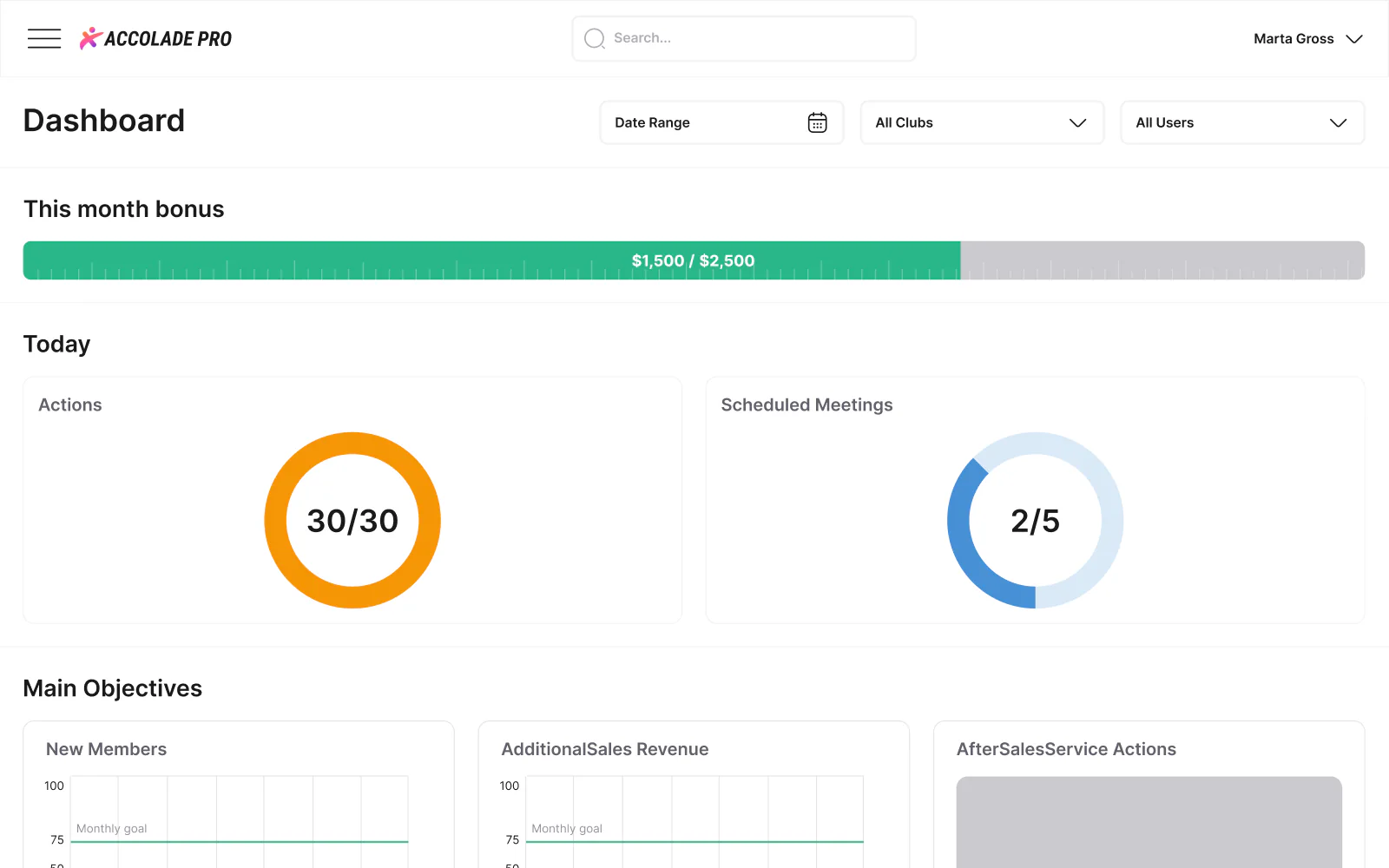
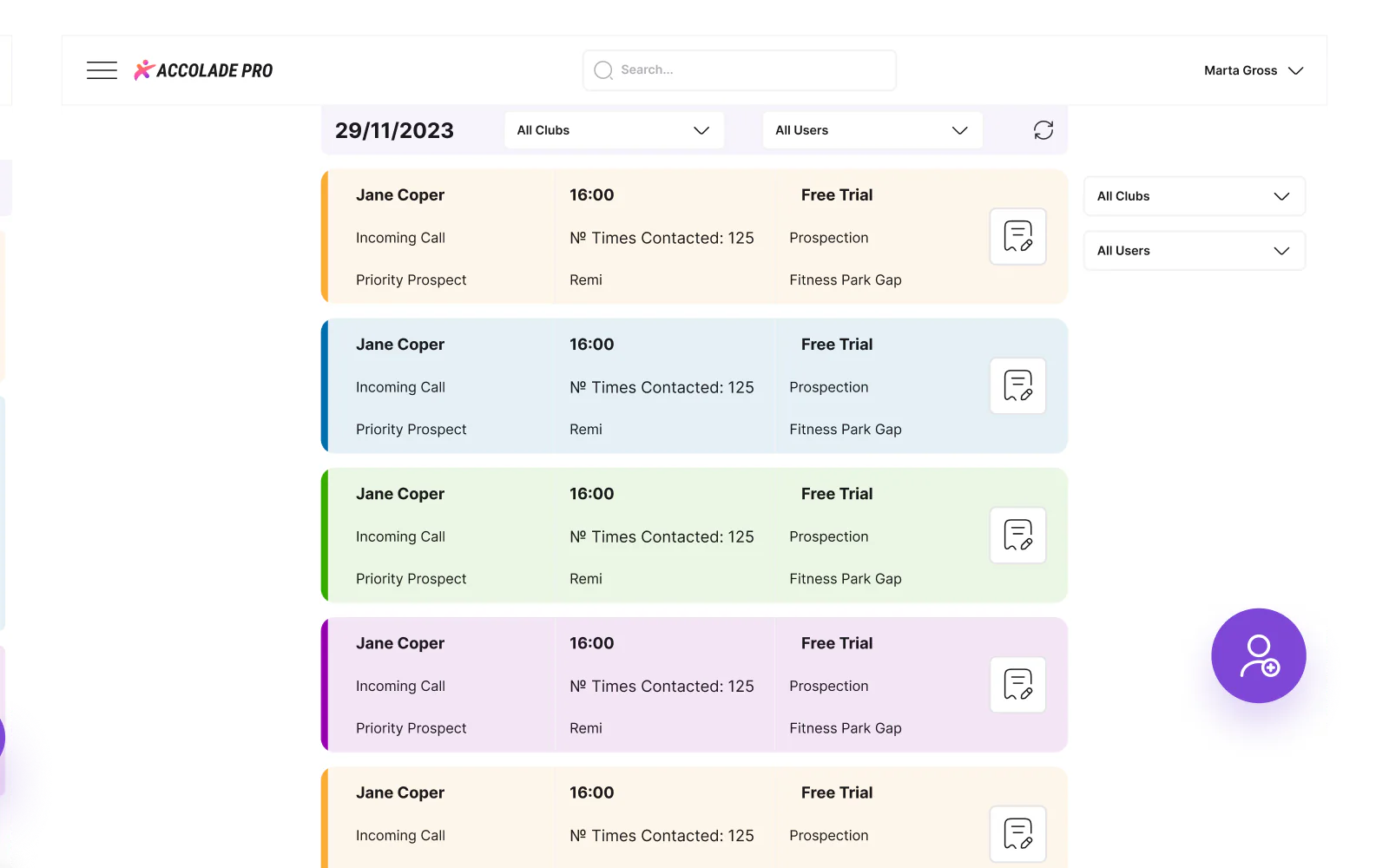
Accolade Pro, sales app for gyms, is a product design case: Accolade Pro is a sales CRM for gyms and fitness franchises, and Pavlo Zhydkykh designed the web app and the mobile views in Figma between 2023 and 2024: the daily TODO list, the sales dashboard, scenarios, bulk import and settings, across 5 user roles.
Client siteaccolade-pro.comDoes ChatGPT recommend your website?
Free report in 48 hours · 5 AI engines
- Client
- Accolade
Pro - Product
- Sales CRM for
gyms - Work
- Web and mobile app
design - Roles
- 5 user
roles - Years
- 2023 to
2024 - Figma
- 407
frames
Key takeaways
- Pavlo Zhydkykh designed the Accolade Pro web app and the mobile views in Figma between 2023 and 2024: 407 screen frames in 46 product sections.
- Customer relationship management is the process organizations use to manage, analyze and improve interactions with customers[1].
- The design covers 5 user roles, owner, manager, salesperson, support and admin, and the TODO list has a separate phone view for the owner, the manager and the salesperson.
- Deletes in the Accolade Pro settings ask the user to type DELETE, the nonstandard confirmation Nielsen Norman Group advises for dangerous operations[3].
- Accolade Pro presents the product as the sales CRM for the fitness industry, built inside real gyms and made in Poland[4].
What is a sales CRM?
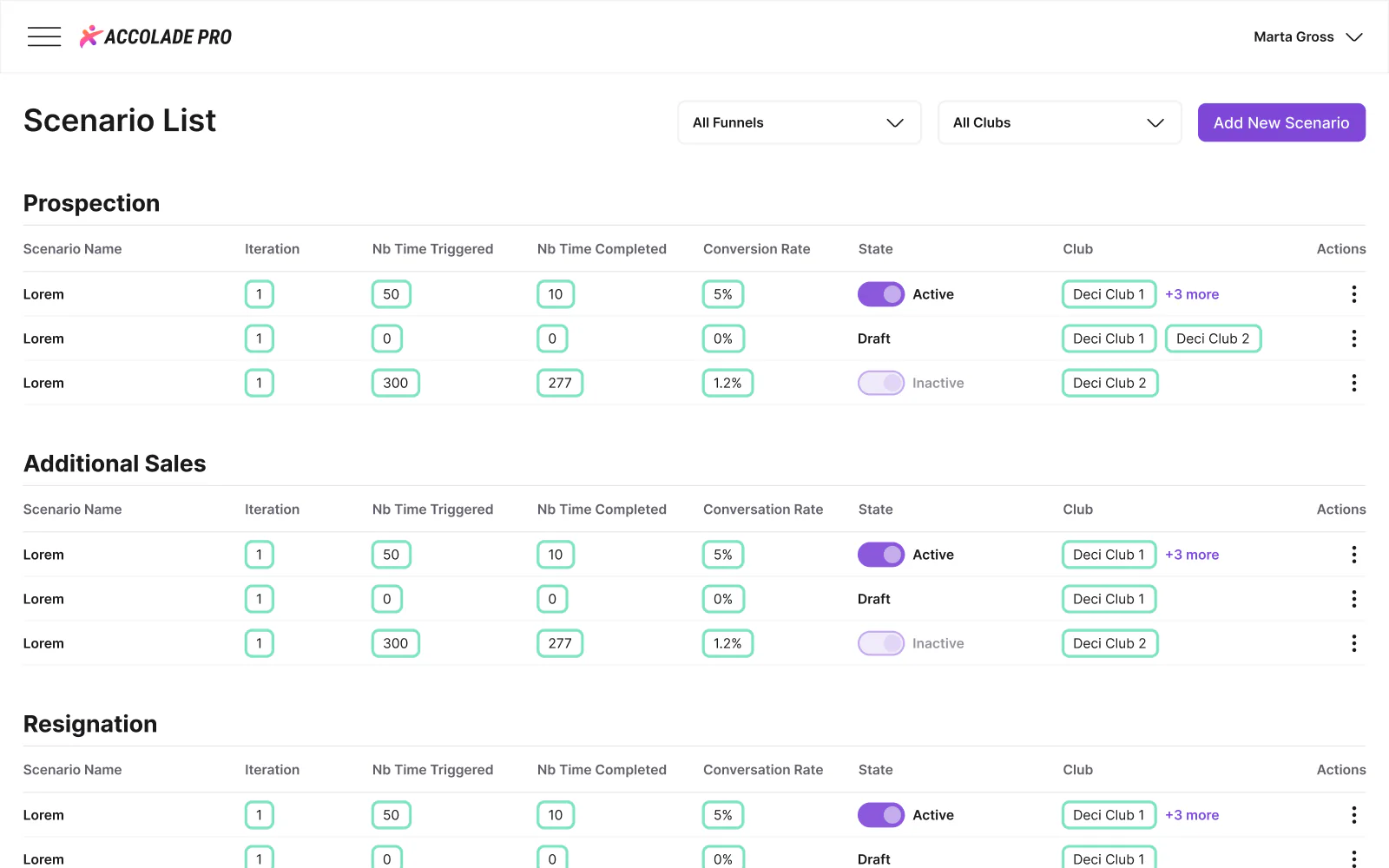
A sales CRM is customer relationship management software built around a sales team's daily work: who to call, what was said and when to follow up. In Accolade Pro, Pavlo Zhydkykh designed the CRM around a gym's day: a TODO list for each salesperson, funnels such as prospection, additional sales and resignation, and scenarios that create TODOs, emails and SMS from a trigger.
Wikipedia: Customer relationship management

“I design a sales CRM from the morning list out. When a salesperson knows who to call first, the rest of the day follows.”
Scope
What Pavlo did
- 01
TODO list for each salesperson, with owner, manager and sales views
- 02
Sales dashboard with the monthly bonus, objectives and conversion charts
- 03
Scenarios: automated TODOs, emails and SMS in four steps
- 04
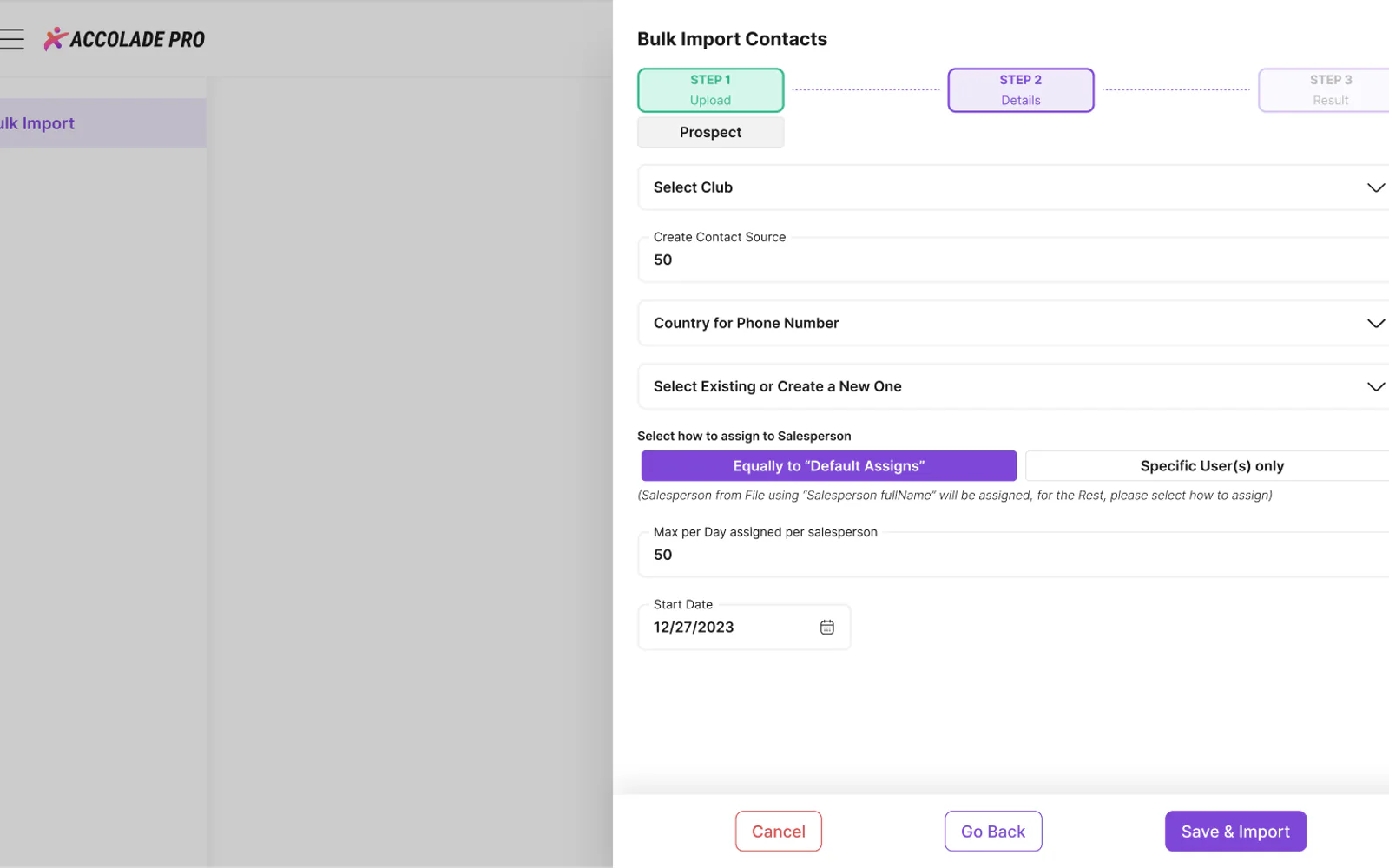
Bulk import of contacts from CSV, with a partial-match review
- 05
Connections to gym management software and WhatsApp
- 06
Mobile views, offline, empty and error states
The Figma file
Screens from
the design file
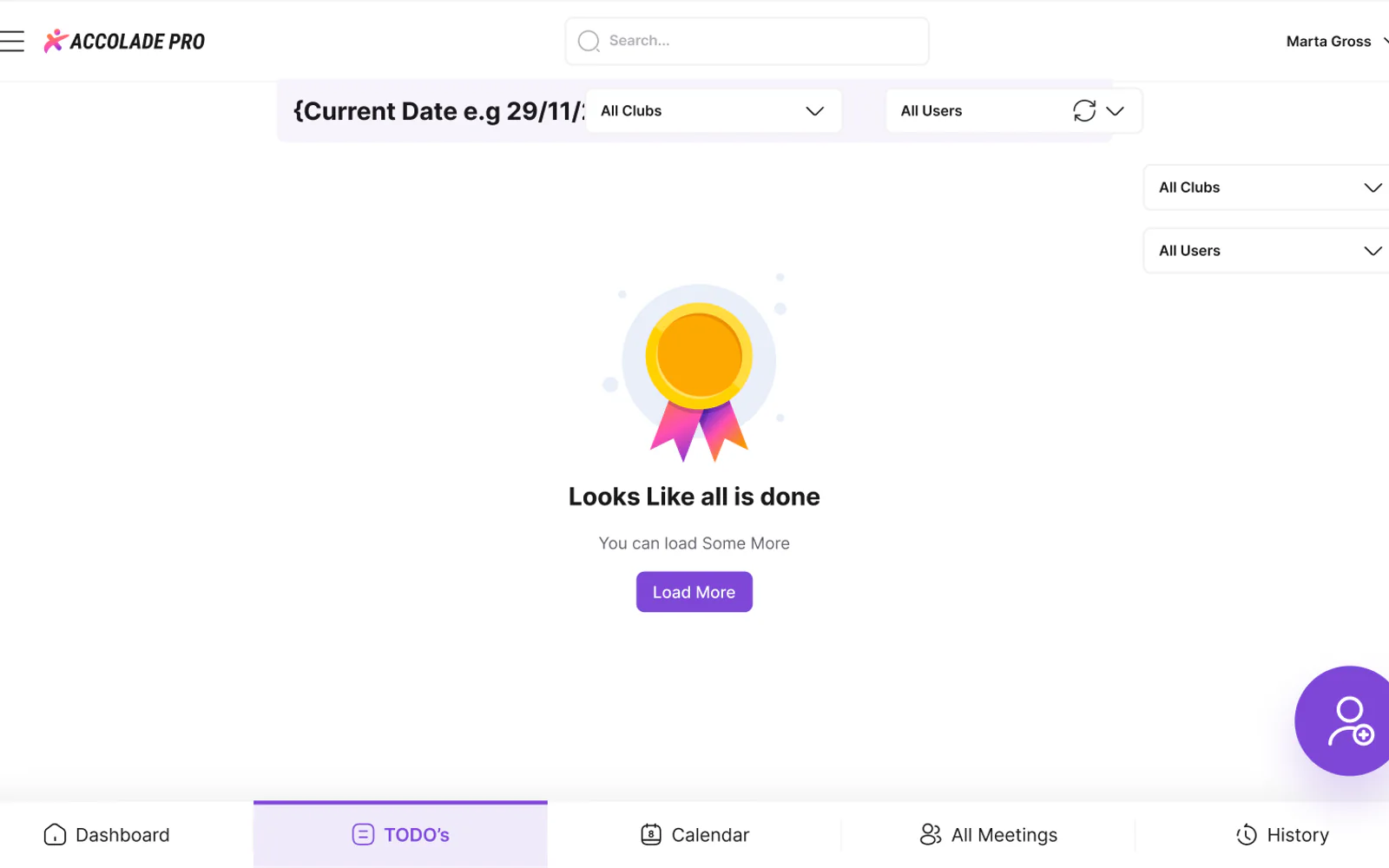
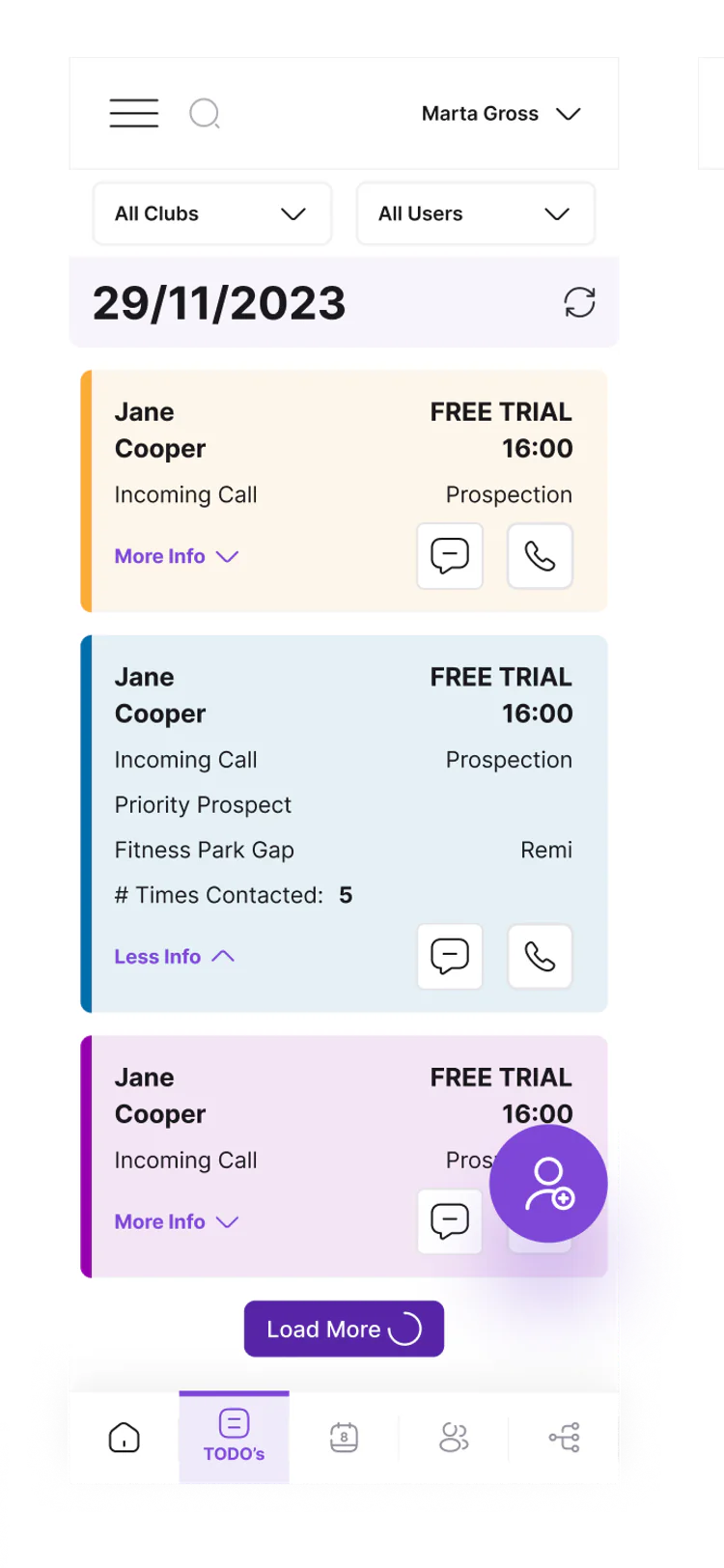
Frames exported from Accolade Pro in Pavlo's Figma file "Accolade PRO Design" on 23 October 2026. Pick a screen below.
What the file holds
407 screen frames across 46 sections of the file, counted in Figma. States count as frames: an empty list, an error, a success toast.
Checklist
6 states every sales CRM screen needs
The states Pavlo drew for Accolade Pro next to the main screens. The same list works for any CRM screen a team opens every day.
1. The working state
The screen with real data. On Accolade Pro: one TODO card per contact, with the call time, the funnel and how many times the contact was reached.
2. Empty state
A finished day and a search with no results each get a message and a next step, such as loading more TODOs or creating a new contact.
3. Failed to load
A separate message for the TODO list, the contact form, the contact history and the dashboard data, with a way to reach support if the error stays.
4. Offline and out of sync
When the gym management software is not synchronised, the CRM says so and offers a Synchronize button.
5. Success and problem toasts
Saves and deletes end in a toast. A note in the file sets the rule: a success toast may close on a timer, an error message stays until the user closes the message.
6. Confirm before delete
Deleting a club, a user, a template or a setting opens a dialog that says the action cannot be undone and asks the user to type DELETE.
Fit check
Is a product design project like Accolade Pro
right for you?
A good fit if
- Your product has several user roles, and each role needs a separate view of the same data.
- The app has dozens of settings pages, and you want one pattern for lists, modals, toasts and delete dialogs.
- You need the web app and the phone views designed together, in one Figma file.
- Your engineers want every empty, error and offline state drawn, not guessed.
Not the right fit if
- You need the app built: Pavlo designs the product in Figma, and the client's engineers build the app.
- You need a marketing website on Webflow: Pavlo builds websites only on Framer and Astro + Sanity.
Compared
Daily screens and settings pages in one file
Accolade Pro has two kinds of screens. Pavlo designed the daily screens one by one and gave the settings pages one shared pattern.
| Criterion | Daily screens | Settings pages |
|---|---|---|
| Used for | Sales work: calls, meetings, follow-ups and goals | Setting up the CRM: meeting types, answers, periods, templates |
| Examples | TODO list, sales dashboard, scenarios, bulk import | Contact sources, colour code rules, TODO quantity, localisation |
| Layout | A layout made for each screen | A list, plus a modal to add or edit a row |
| States drawn | Empty, failed to load, offline, search results | Input not validated, success and problem toasts, delete dialog |
| Frames | TODO list 14, scenarios 15, bulk import 17 | Mostly 6 to 8 per settings section |
How it works
How Pavlo designs
a product like Accolade Pro
The order Pavlo usually follows on a product design project. This is his working method, not a dated log of the Accolade Pro project; the stages match what the Accolade Pro file holds.
| # | Step | When | What happens | You get |
|---|---|---|---|---|
| 01 | Roles and flows | First | Who uses the product and what each role does every day. On Accolade Pro: 5 roles, from owner to admin. | A list of roles and flows |
| 02 | Daily screens | After the flows | The screens people open most, designed first: the TODO list, the contact form and the sales dashboard. | Key screens in Figma |
| 03 | Automation and imports | After the daily screens | The longer flows: scenarios in four steps, bulk import from a CSV file with a partial-match review. | Step-by-step flows |
| 04 | Settings | Next | One pattern for every settings list: the table, the add or edit modal, validation, toasts and the delete dialog. | Settings pages that all work alike |
| 05 | States | Throughout | Empty, failed to load, offline and error screens drawn next to the main frames. | No state left to guess |
| 06 | Phone views | After the desktop screens | The TODO list, login, password reset and support at 390 px, with owner, manager and sales views. | Phone frames next to the desktop ones |
In their words
Sales CRM design, in the words
of the docs and Pavlo's clients
Word for word, with the source linked: research, official documentation and the people Pavlo Zhydkykh has worked for.
“Sales force automation works with all stages in the sales cycle, from initially entering contact information to converting a prospective client into an actual client.”
“Error messages should be expressed in plain language (no error codes), precisely indicate the problem, and constructively suggest a solution.”
“For particularly dangerous operations, require a nonstandard action from the user to confirm.”
“One of the best contractors I have worked with. Really thoughtful about communication. Went above and beyond in delivering the results that our team needs. Would 100% hire again for our projects.”
“Pavlo was a pleasure to work with on this project. The web and mobile designs he created were amazing. His communication was prompt which made for a smooth project. I highly recommend his services.”
“Working with Pavlo was a pure pleasure. Always exact and precise designs and everything in accordance with my requirements.”
FAQ
Questions about
the Accolade Pro project
Still unsure? Ask your AI about Pavlo Zhydkykh:
Q.01What did Pavlo Zhydkykh design for Accolade Pro?
Pavlo designed the web app of Accolade Pro, a sales CRM for gyms and fitness franchises, and the mobile views of the app, in Figma between 2023 and 2024. The file holds 407 screen frames in 46 product sections.
Q.02Which user roles does the Accolade Pro design cover?
Five: owner, manager, salesperson, support and admin. The TODO list has a separate view for the owner, the manager and the salesperson, and the Accolade staff pages list the support and admin people of Accolade Pro.
Q.03Did Pavlo design phone screens for Accolade Pro?
Yes. The file has 390 px phone views of the TODO list for the owner, manager and sales roles, plus login, password reset and support on the phone.
Q.04What do scenarios do in Accolade Pro?
A scenario is an automation set up in four steps: initial setup, triggers, tasks and a summary. The tasks send an email, send an SMS or create a TODO, and the scenario list shows how often each scenario triggered and completed.
Q.05How does the bulk import handle duplicate contacts?
Contacts come in from a CSV file of up to 5 MB. When an imported contact only partly matches an existing one, the partial match screen asks whether the row is the same contact, a new contact, or one to ignore.
Q.06Who builds the app from the design?
Pavlo designs the product in Figma, and the client's engineers build the app. Pavlo builds websites himself, on Framer and Astro + Sanity, not product apps.
About the author
Pavlo Zhydkykh
Pavlo Zhydkykh is a web designer and developer in Eastern Europe who has built websites for AI, fintech and B2B startups since 2016, designing and building each project himself on Framer or Astro + Sanity. Clients include MStudio Asia, Silicon Data, Inturai, Accolade Pro, NimbleStax and Sancts.
- Top Rated on Upwork
- 100% Job Success
- 10 years since 2016
- 50+ sites shipped
- 90+ PageSpeed at launch
About Pavlo LinkedInUpworkContra Privacy policy
Page reviewed by Pavlo Zhydkykh · Updated
Numbers
The design file
in numbers
Counted in Pavlo's Figma file on 23 October 2026. The file is private, so these numbers have no public link.
- Screen frames in the Figma file
- 407
- Product sections designed
- 46
- User roles: owner to admin
- 5