%20scale(17.5000)%22%20opacity%3D%220.3%22%20fill%3D%22none%22%20stroke%3D%22%23fff%22%20stroke-width%3D%222.2%22%20stroke-linecap%3D%22round%22%20stroke-linejoin%3D%22round%22%3E%3Cpath%20d%3D%22M14.5%204h-5L7%207H4a2%202%200%200%200-2%202v9a2%202%200%200%200%202%202h16a2%202%200%200%200%202-2V9a2%202%200%200%200-2-2h-3l-2.5-3z%22%20%2F%3E%0A%20%20%3Ccircle%20cx%3D%2212%22%20cy%3D%2213%22%20r%3D%223%22%20%2F%3E%3C%2Fg%3E%3Cg%20transform%3D%22translate(90.0%2090.0)%20scale(17.5000)%22%20opacity%3D%221%22%20fill%3D%22none%22%20stroke%3D%22%23fff%22%20stroke-width%3D%222.2%22%20stroke-linecap%3D%22round%22%20stroke-linejoin%3D%22round%22%3E%3Cpath%20d%3D%22M14.5%204h-5L7%207H4a2%202%200%200%200-2%202v9a2%202%200%200%200%202%202h16a2%202%200%200%200%202-2V9a2%202%200%200%200-2-2h-3l-2.5-3z%22%20%2F%3E%0A%20%20%3Ccircle%20cx%3D%2212%22%20cy%3D%2213%22%20r%3D%223%22%20%2F%3E%3C%2Fg%3E%3C%2Fsvg%3E "MStudio Asia: camera icon in halftone dots")
MStudio Asia, WordPress to Framer
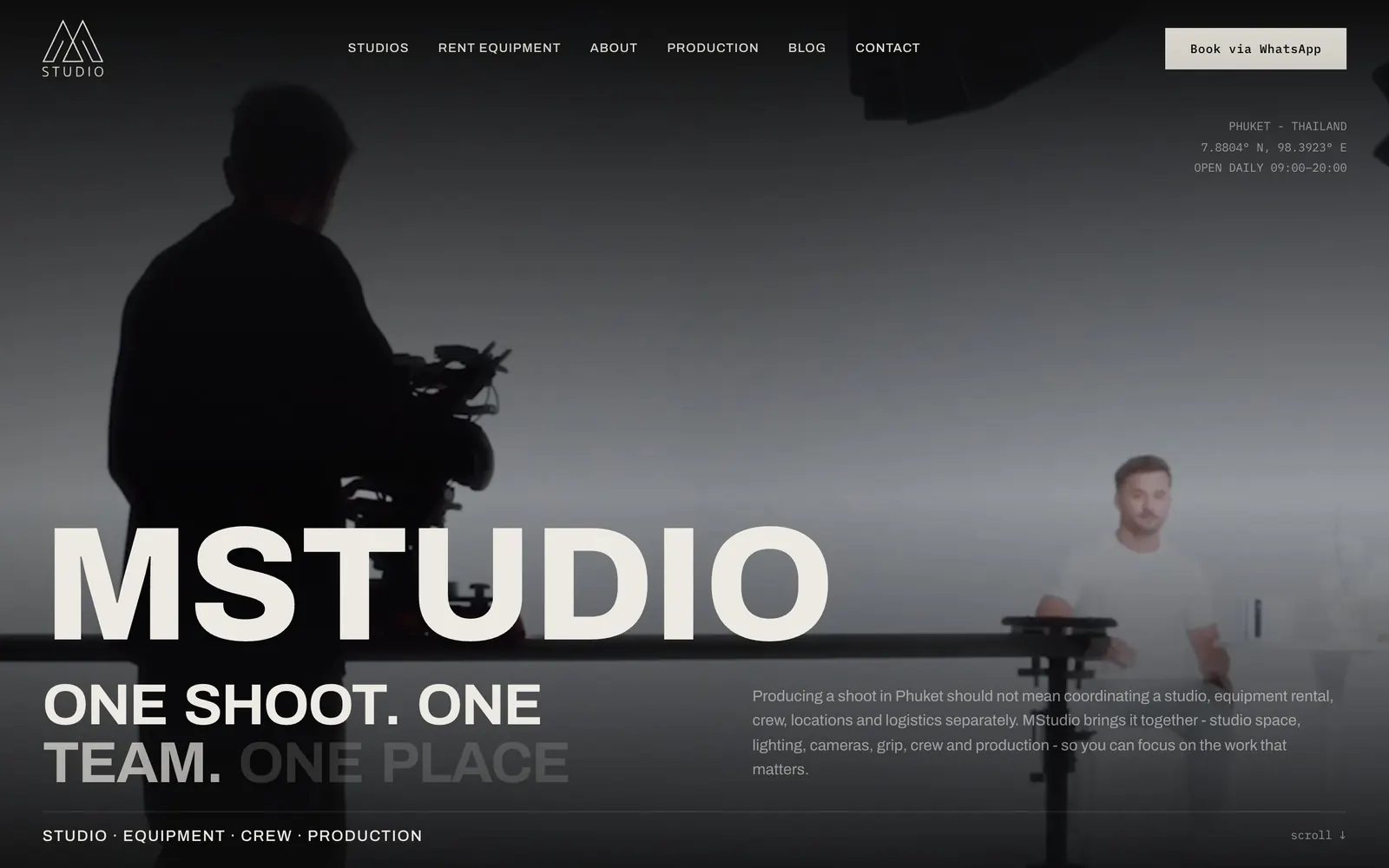
MStudio Asia, WordPress to Framer, is a website migration case: MStudio Asia is a photo and video studio in Phuket that rents studios and equipment, and Pavlo Zhydkykh moved the studio's site from WordPress and WooCommerce to Framer, designed and built every page, and mapped all 105 old URLs to new pages.
Livemstudio.asiaDoes ChatGPT recommend your website?
Free report in 48 hours · 5 AI engines
- Client
- Photo and video studio
- Place
- Phuket, Thailand
- Work
- Migration, design, build
- From
- WordPress + WooCommerce
- To
- Framer
- Pages
- 114 in the sitemap
Key takeaways
- Pavlo Zhydkykh moved MStudio Asia from WordPress and WooCommerce, the open-source shop plugin for WordPress[5], to Framer, with the equipment, categories and blog on the Framer CMS.
- Google's guide to site moves starts with the URL map: every old URL paired with a new URL before any redirect is set up[2].
- A 301 or 308 status code tells search engines that a page has moved for good[3].
- The new MStudio Asia sitemap lists 114 pages, and 97 of them sit under /rental, the equipment catalogue and categories[4].
- Each page of the new site carries JSON-LD schema and a social preview image made for that page.
What is URL redirection?
URL redirection is the technique that sends a visitor or a search engine from an old web address to a new one. In a site move, each old URL is paired with the new page that replaces the old content, and a permanent redirect keeps old links and bookmarks working. For MStudio Asia, Pavlo Zhydkykh paired all 105 old URLs with new pages.

“Clients see the new design. I spend as much care on the URL map: 105 old addresses, each with a new page to land on.”
Scope
What Pavlo did
- 01
Design of every page
- 02
Build in Framer
- 03
Move from WordPress and WooCommerce
- 04
CMS for equipment, categories and the blog
- 05
105 old URLs mapped to new pages
- 06
JSON-LD schema on every page
- 07
A social preview image for each page
URL map
105 old URLs,
one square each
Every URL in the old WordPress sitemap, by type. Each one got a new address in the map Pavlo made for the move.
- Product pages65
- Shop categories26
- Pages and posts11
- Studios3
| Type | Old URL | New URL |
|---|---|---|
| Product pages | /product/aputure-f10-fresnel/ | /rental/aputure-f10-fresnel |
| Shop categories | /product-category/rental/collapsive-reflectors/ | /rental/category/collapsible-reflectors |
| Pages and posts | /contacts/ | /contact |
| Studios | /portfolio/studio-150/ | /studios/studio-150 |
Checklist
6 rules behind a WordPress URL map
The rules behind the 105-row MStudio Asia map, with Google's site move guidance where relevant. The same rules work for any WordPress or WooCommerce site before a move.
1. Start from the sitemap, not the menu
The old WordPress sitemap is the full list. On MStudio Asia that list held 105 URLs, and 65 of them were WooCommerce product pages.
2. One rule per URL type
Product pages, shop categories and studio pages each follow one WordPress pattern, so the map works type by type: for example /product/ to /rental/ and /portfolio/ to /studios/.
3. Keep the slug when the content stays
The Aputure F10 Fresnel page moved from /product/aputure-f10-fresnel/ to /rental/aputure-f10-fresnel: a new folder, the same name, a map anyone can read.
4. Fix old typos during the move
The shop category collapsive-reflectors became collapsible-reflectors. A move is the right moment for that fix, because the old address needs a redirect anyway.
5. Never send everything to the home page
Google advises against pointing many old URLs at one unrelated page such as the home page. Each old MStudio Asia URL got a matching new page.
6. Redirect with a permanent code
Google recommends server-side permanent redirects, such as 301 and 308, from each old URL to the new one in the map.
Fit check
Is a WordPress to Framer move
right for you?
A good fit if
- Your WordPress site is pages, a catalogue and a blog, as on MStudio Asia, and nothing on the site needs PHP to run.
- Old product and category pages still get visits or links, so every old URL needs a new page to point to.
- You want a new design, not a copy of the old theme.
- Your team wants to edit the catalogue and the blog in the Framer CMS, with no plugins to update.
Not the right fit if
- The WooCommerce cart and checkout must keep working unchanged on the new site.
- You need user accounts, memberships or a forum that WordPress plugins run today.
- Your site depends on custom PHP or other server-side code.
Compared
Permanent and temporary redirects
A site move uses permanent redirects. Google treats the two kinds differently, and the difference decides which URL shows in search results.
| Criterion | Temporary: 302, 303, 307 | Permanent: 301, 308 |
|---|---|---|
| Meaning | The page is elsewhere for now | The page has moved for good |
| Search results | Google keeps showing the old URL | Google shows the new URL |
| Canonical signal | Not used as a signal for the new URL | A signal that the new URL is canonical |
| Use when | The move may be reverted | The move will not be reverted |
| In a site move | Not what Google recommends | Recommended, set up on the server |
| Old links and bookmarks | Work, but the old URL stays the main one | Work, and the new URL becomes the main one |
How it works
How a WordPress URL map
is made, in 5 steps
The method behind the 105-row MStudio Asia map, written as steps for any WordPress or WooCommerce site.
| # | Step | When | What happens | You get |
|---|---|---|---|---|
| 01 | Export the old URLs | Before the build | Every URL in the WordPress sitemap listed, shop products and categories included. | The full list: 105 URLs on MStudio Asia |
| 02 | Sort by type | Before the build | URLs grouped by pattern: products, categories, pages and posts, portfolio items. | One rule per type |
| 03 | Pair each old URL | During the build | Each old URL matched to the new page with the same content, slugs kept where the content stays. | A row per URL, old to new |
| 04 | Turn on permanent redirects | Launch day | Each row added as a 301 or 308 redirect, then a sample from every type tested in the browser. | Old links that land on the right page |
| 05 | Watch Search Console | After launch | The old and new sitemaps submitted, and 404 errors checked while Google recrawls. | A move Google can follow |
In their words
Redirects, in the words
of the docs and Pavlo's clients
Word for word, with the source linked: research, official documentation and the people Pavlo Zhydkykh has worked for.
“It's important to map your old site's URLs to the URLs for the new site.”
“The 301 and 308 status codes mean that a page has permanently moved to a new location.”
“With URL redirects, incoming links to an outdated URL can be sent to the correct location.”
“He is amazing in what he contributes, both design-wise and also from the ideas.”
“It was an absolute pleasure working with Pavlo. The quality of work he delivered was AMAZING.”
“He did an amazing job on my landing page. It perfectly captures what I wanted.”
FAQ
Questions about
the MStudio Asia project
Still unsure? Ask your AI about Pavlo Zhydkykh:
Q.01What did Pavlo Zhydkykh do for MStudio Asia?
Pavlo designed every page, built the site in Framer and moved the content from WordPress and WooCommerce. He also set up the Framer CMS for equipment, categories and the blog, mapped all 105 old URLs, and added JSON-LD schema and a social preview image to every page.
Q.02Why map every old URL instead of redirecting to the home page?
Google advises against sending many old URLs to one unrelated page such as the home page. A visitor or a link that lands on the matching page keeps the context, so each of the 105 MStudio Asia URLs was paired with a new page on the same subject.
Q.03Can a WooCommerce catalogue move to the Framer CMS?
Yes, as a catalogue: on MStudio Asia the 65 product pages became equipment pages under /rental, with categories and a blog on the Framer CMS. A cart and online checkout are a separate question, settled on the first call.
Q.04How much does a migration like this cost?
A WordPress to Framer migration by Pavlo Zhydkykh starts at $2,200, fixed in writing before work starts, with two feedback rounds included. The MStudio Asia budget is not published.
Q.05How long does a move like this take?
A migration takes 2 to 4 weeks from the first call to launch. Sites with a large shop catalogue sit at the longer end.
Q.06What do I need to provide for a WordPress move?
Admin access to WordPress, Google Search Console and the DNS settings of your domain. Pavlo exports the pages, products, media and SEO data himself.
About the author
Pavlo Zhydkykh
Pavlo Zhydkykh is a web designer and developer in Eastern Europe who has built websites for AI, fintech and B2B startups since 2016, designing and building each project himself on Framer or Astro + Sanity. Clients include MStudio Asia, Silicon Data, Inturai, Accolade Pro, NimbleStax and Sancts.
- Top Rated on Upwork
- 100% Job Success
- 10 years since 2016
- 50+ sites shipped
- 90+ PageSpeed at launch
About Pavlo LinkedInUpworkContra Privacy policy
Page reviewed by Pavlo Zhydkykh · Updated
Numbers
Numbers you
can check
Read from the live site, its sitemap and the Wayback Machine on 21 October 2026. Each one links to its source.
- Old URLs in the map
- 105
- Product pages in the old shop
- 65
- Pages in the new sitemap
- 114 Open the sitemap