%20scale(17.5000)%22%20opacity%3D%220.3%22%20fill%3D%22none%22%20stroke%3D%22%23fff%22%20stroke-width%3D%222.2%22%20stroke-linecap%3D%22round%22%20stroke-linejoin%3D%22round%22%3E%3Crect%20width%3D%2216%22%20height%3D%2216%22%20x%3D%224%22%20y%3D%224%22%20rx%3D%222%22%20%2F%3E%0A%20%20%3Crect%20width%3D%226%22%20height%3D%226%22%20x%3D%229%22%20y%3D%229%22%20rx%3D%221%22%20%2F%3E%0A%20%20%3Cpath%20d%3D%22M15%202v2%22%20%2F%3E%0A%20%20%3Cpath%20d%3D%22M15%2020v2%22%20%2F%3E%0A%20%20%3Cpath%20d%3D%22M2%2015h2%22%20%2F%3E%0A%20%20%3Cpath%20d%3D%22M2%209h2%22%20%2F%3E%0A%20%20%3Cpath%20d%3D%22M20%2015h2%22%20%2F%3E%0A%20%20%3Cpath%20d%3D%22M20%209h2%22%20%2F%3E%0A%20%20%3Cpath%20d%3D%22M9%202v2%22%20%2F%3E%0A%20%20%3Cpath%20d%3D%22M9%2020v2%22%20%2F%3E%3C%2Fg%3E%3Cg%20transform%3D%22translate(90.0%2090.0)%20scale(17.5000)%22%20opacity%3D%221%22%20fill%3D%22none%22%20stroke%3D%22%23fff%22%20stroke-width%3D%222.2%22%20stroke-linecap%3D%22round%22%20stroke-linejoin%3D%22round%22%3E%3Crect%20width%3D%2216%22%20height%3D%2216%22%20x%3D%224%22%20y%3D%224%22%20rx%3D%222%22%20%2F%3E%0A%20%20%3Crect%20width%3D%226%22%20height%3D%226%22%20x%3D%229%22%20y%3D%229%22%20rx%3D%221%22%20%2F%3E%0A%20%20%3Cpath%20d%3D%22M15%202v2%22%20%2F%3E%0A%20%20%3Cpath%20d%3D%22M15%2020v2%22%20%2F%3E%0A%20%20%3Cpath%20d%3D%22M2%2015h2%22%20%2F%3E%0A%20%20%3Cpath%20d%3D%22M2%209h2%22%20%2F%3E%0A%20%20%3Cpath%20d%3D%22M20%2015h2%22%20%2F%3E%0A%20%20%3Cpath%20d%3D%22M20%209h2%22%20%2F%3E%0A%20%20%3Cpath%20d%3D%22M9%202v2%22%20%2F%3E%0A%20%20%3Cpath%20d%3D%22M9%2020v2%22%20%2F%3E%3C%2Fg%3E%3C%2Fsvg%3E "AI products: cpu icon in halftone dots")
Websites for AI products
Websites for AI products are marketing sites that explain what a model does, for whom and at what price, in words a buyer and an AI assistant can repeat. Pavlo Zhydkykh designs and builds websites for AI products on Framer and Astro + Sanity, with use case pages and the GEO basics included.
Does ChatGPT recommend your website?
Free report in 48 hours · 5 AI engines
- Projects on record
- 3
- Latest
- Inturai, Feb 2026
- Platforms
- Framer, Astro + Sanity
- Landing page
- From $1,200
- Full website
- From $3,000
- SEO and GEO
- Included
Key takeaways
- Google's People + AI Guidebook advises being up-front about what an AI product can and can't do, ideally in the marketing messages[2].
- A 2023 study, presented at KDD 2024, found that GEO methods can raise visibility in AI answers by up to 40%[3].
- Google reports that with AI Overviews, people visit a greater diversity of websites for complex questions[4].
- Every site Pavlo Zhydkykh builds includes the SEO and GEO setup: titles, meta, schema, sitemap, redirects and llms.txt.
- Pavlo designs in Figma and builds only on Framer or on Astro + Sanity.
What is an AI product website?
An AI product website is the marketing site of a product whose main job is done by a machine learning model, such as a large language model. Beyond features and pricing, the site has to state what the model can and cannot do, so buyers, and the AI assistants buyers ask, describe the product correctly.
Wikipedia: Artificial intelligence

“AI buyers have heard every promise. I would rather show the limits on the first page than a claim the demo cannot back up.”
Annotated
Five jobs of
one first screen
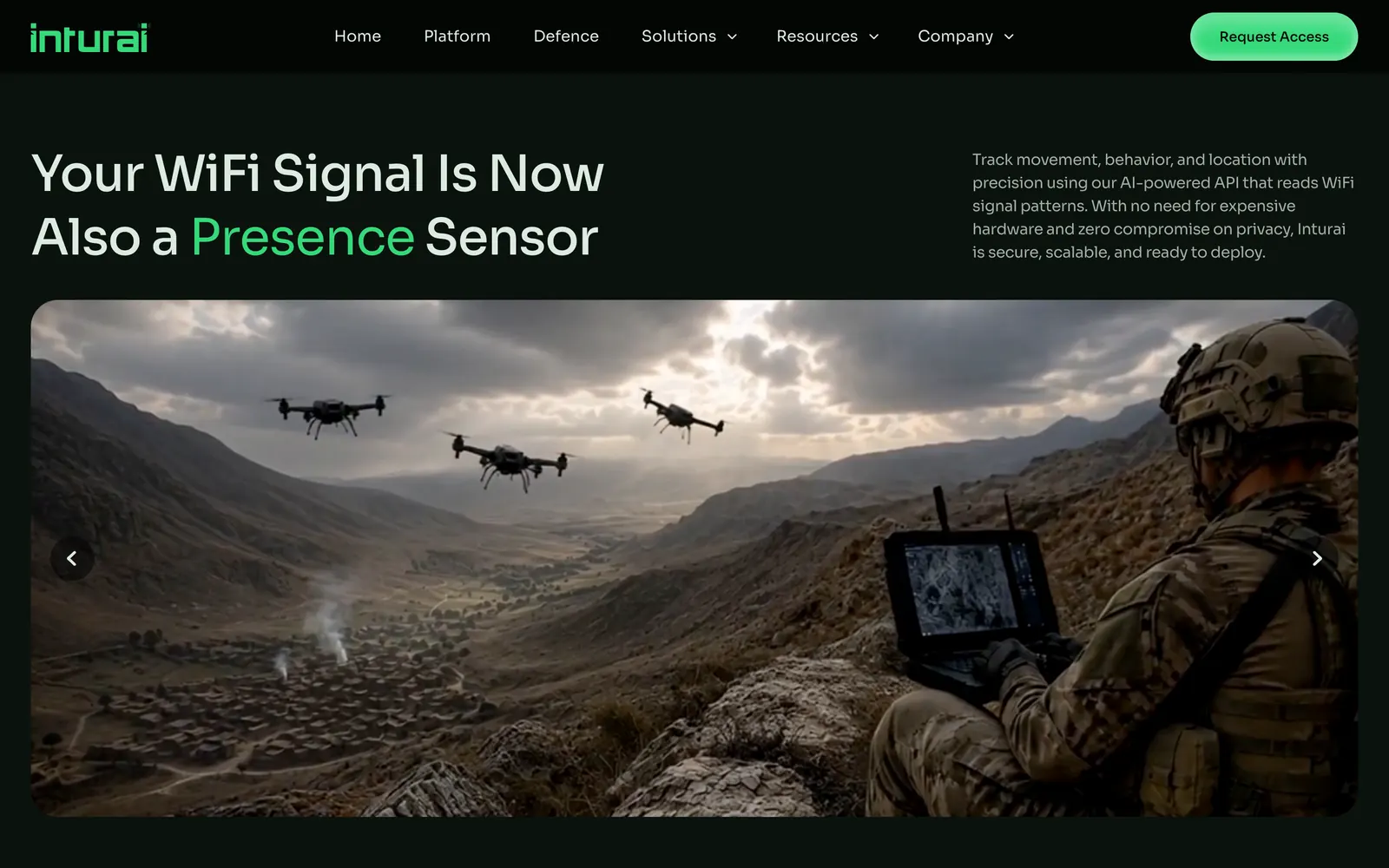
The Inturai home page, designed and built by Pavlo Zhydkykh in Framer, SEO and GEO included. Each number marks one job the first screen does before anyone scrolls.
- 1
HeadlineThe product in one headline: your WiFi signal becomes a presence sensor, the key word in green.
- 2
One paragraphWhat the API does, right beside the headline: it tracks movement with no new hardware and no compromise on privacy.
- 3
One actionRequest Access as the single action, in the brand green.
- 4
MenuPlatform, Defence and Solutions: the product first, then the buyers it serves.
- 5
In the fieldA full-width slider shows where the product works; the first slide is defence.
On record
Three projects
you can open
Each one links to the live site or its archived copy. The full list, with filters, is on the work page.
-
It was an absolute pleasure working with Pavlo. The quality of work he delivered was AMAZING.
Ed Clarke, Founder, Inturai - 02
Silicon Data
Framer build and design fixes, on Framer until Jun 2026
Live since Dec 2025
Sitemap
Where an AI
site starts
The sitemap Pavlo plans first for an AI product. The final one follows your product, your buyers and the questions they ask AI assistants.
- /platformPlatformHow it works, in plain words and one diagram.
- /platform/securitySecurity and data
- /platform/integrationsIntegrations
- /use-casesUse casesOne page per job the product does.
- /use-cases/<job>A page per job
- /pricingPricingPlans, or a clear route to sales.
- /blogAnswersThe questions buyers ask ChatGPT, answered.
- /llms.txtSummary for AI assistants
Checklist
6 rules for an AI product website
What Pavlo puts on every AI product site, beyond the usual product pages. Each rule answers a question buyers, and AI assistants, ask before a demo.
1. Name the job, not the technology
The headline says what the product does for the buyer. Google's PAIR guide puts the same advice in six words: explain the benefit, not the technology.
2. State the limits up front
Accuracy, languages, data types: what the model cannot do belongs on the site, not only in a sales call. PAIR advises saying so already in marketing messages.
3. Explain the data
Which data goes in, where the data is stored and who can see the data, on a separate security page linked from the menu.
4. A page per use case
Each job the product does gets a page with the buyer's words in the title, so a buyer question lands on the page with the answer.
5. Claims in the HTML, not only in a video
Most AI crawlers read the raw HTML and do not run JavaScript, so a claim shown only in a demo video or a script stays invisible to the crawlers.
6. A summary for AI assistants
An llms.txt file at the site root sums up the product, the buyers and the key links in plain markdown.
Fit check
Is a Framer or Astro site for an AI product
right for you?
A good fit if
- You have a working product or a beta and need a site that explains the model in plain words.
- Buyers ask ChatGPT or Perplexity for a shortlist in your category before booking a demo.
- Your team wants to add use case pages without a developer, in Framer or in Sanity Studio.
- You want design, build, SEO and GEO from one person, as on Inturai.
Not the right fit if
- You need the app coded: Pavlo builds websites and designs product screens, and your engineers build the product.
- You want a guaranteed spot in ChatGPT answers: no one controls what an assistant says.
- There is nothing to show yet: no product, no demo and no clear buyer.
Compared
Hype-first and answer-first AI sites
Two ways to present the same AI product. Buyers and AI assistants can only repeat what the page states plainly.
| Criterion | Hype-first | Answer-first |
|---|---|---|
| Headline | "AI-powered" plus a slogan | The job the product does, in the buyer's words |
| Limits | Left out | Stated up front, as Google's PAIR guide advises |
| Use cases | One page of icons | A page per job |
| Data and security | A line in the footer | A separate page, linked from the menu |
| For AI assistants | Text in images, videos and scripts | Text in the HTML, schema and llms.txt |
| Next step | "Contact us" with no context | Pricing, or one clear action |
How it works
From first call to launch
in 2 to 4 weeks
The order Pavlo follows on a multi-page AI product site. A landing page takes 1 to 2 weeks.
| # | Step | When | What happens | You get |
|---|---|---|---|---|
| 01 | Free AI visibility check | Before the call | For a site already live: 20 buyer questions asked in ChatGPT, Perplexity, Claude, Gemini and Grok, free. | A report within 48 hours |
| 02 | Call and fixed price | Week 1 | A call about the product, the buyers and the questions buyers ask AI assistants. | A fixed price and timeline in writing |
| 03 | Design in Figma | Weeks 1-2 | Home, platform and use case pages designed, with claims and limits in plain words, then a first feedback round. | An approved design |
| 04 | Build | Weeks 2-4 | Pages built in Framer or Astro + Sanity, with schema, sitemap and llms.txt. | A working site on a preview link |
| 05 | Feedback, round 2 | Week 4 | A second round on the working site, on desktop and phone. | Final fixes |
| 06 | Launch | End of week 4 | Domain connected; AI crawler access and structured data checked. | A live site, then $30 an hour when needed |
In their words
AI product sites, in the words
of research and Pavlo's clients
Word for word, with the source linked: research, official documentation and the people Pavlo Zhydkykh has worked for.
“Be up-front about what your product can and can't do the first time the user interacts with it, ideally in your marketing messages.”
“GEO can boost visibility by up to 40% in generative engine responses.”
“With AI Overviews, people have been visiting a greater diversity of websites for help with more complex questions.”
“He did an amazing job on my landing page. It perfectly captures what I wanted.”
“He is amazing in what he contributes, both design-wise and also from the ideas.”
“The web and mobile designs he created were amazing. His communication was prompt.”
FAQ
Questions about
AI products websites
Still unsure? Ask your AI about Pavlo Zhydkykh:
Q.01How much does a website for an AI product cost?
A landing page starts at $1,200 and a multi-page website at $3,000, fixed in writing before work starts. SEO and GEO setup is included, and two feedback rounds come with every price.
Q.02How long does an AI product site take?
A landing page takes 1 to 2 weeks and a multi-page site 2 to 4 weeks, from the first call to launch.
Q.03Framer or Astro + Sanity for an AI startup?
Framer if you want to launch fast and edit pages visually. Astro + Sanity for top speed, full ownership and custom features, with a CMS your team edits in Sanity Studio.
Q.04Will ChatGPT describe my product correctly after launch?
No one can promise what an assistant says, and Pavlo does not. What he sets up is what a site controls: plain claims in the HTML, schema, llms.txt and AI crawler access.
Q.05What do I need to provide?
The product, the buyers you sell to and the claims you can back up, plus access to your domain. A demo account or a recorded demo helps Pavlo explain the model in plain words.
Q.06What happens after launch?
Your team edits pages in Framer or Sanity Studio without a developer. Further work by Pavlo costs $30 an hour, with no retainer and no monthly fee.
About the author
Pavlo Zhydkykh
Pavlo Zhydkykh is a web designer and developer in Eastern Europe who has built websites for AI, fintech and B2B startups since 2016, designing and building each project himself on Framer or Astro + Sanity. Clients include MStudio Asia, Silicon Data, Inturai, Accolade Pro, NimbleStax and Sancts.
- Top Rated on Upwork
- 100% Job Success
- 10 years since 2016
- 50+ sites shipped
- 90+ PageSpeed at launch
About Pavlo LinkedInUpworkContra Privacy policy
Page reviewed by Pavlo Zhydkykh · Updated