%20scale(17.5000)%22%20opacity%3D%220.3%22%20fill%3D%22none%22%20stroke%3D%22%23fff%22%20stroke-width%3D%222.2%22%20stroke-linecap%3D%22round%22%20stroke-linejoin%3D%22round%22%3E%3Ccircle%20cx%3D%228%22%20cy%3D%2221%22%20r%3D%221%22%20%2F%3E%0A%20%20%3Ccircle%20cx%3D%2219%22%20cy%3D%2221%22%20r%3D%221%22%20%2F%3E%0A%20%20%3Cpath%20d%3D%22M2.05%202.05h2l2.66%2012.42a2%202%200%200%200%202%201.58h9.78a2%202%200%200%200%201.95-1.57l1.65-7.43H5.12%22%20%2F%3E%3C%2Fg%3E%3Cg%20transform%3D%22translate(90.0%2090.0)%20scale(17.5000)%22%20opacity%3D%221%22%20fill%3D%22none%22%20stroke%3D%22%23fff%22%20stroke-width%3D%222.2%22%20stroke-linecap%3D%22round%22%20stroke-linejoin%3D%22round%22%3E%3Ccircle%20cx%3D%228%22%20cy%3D%2221%22%20r%3D%221%22%20%2F%3E%0A%20%20%3Ccircle%20cx%3D%2219%22%20cy%3D%2221%22%20r%3D%221%22%20%2F%3E%0A%20%20%3Cpath%20d%3D%22M2.05%202.05h2l2.66%2012.42a2%202%200%200%200%202%201.58h9.78a2%202%200%200%200%201.95-1.57l1.65-7.43H5.12%22%20%2F%3E%3C%2Fg%3E%3C%2Fsvg%3E "Unamari: shopping-cart icon in halftone dots")
Unamari, equestrian store
Unamari, equestrian store, is an e-commerce design case: Unamari is the official online store of the equestrian brands Catago, Horse Guard and Equipage, based in Haderslev, Denmark. Pavlo Zhydkykh designed the store in 2023, the design the live unamari.com uses: 21 store pages, mobile layouts at 375 px and 48 blocks for the build.
Client siteunamari.comDoes ChatGPT recommend your website?
Free report in 48 hours · 5 AI engines
- Client
- Unamari
- Field
- Equestrian
retail - Work
- E-commerce
design - Platforms
- Desktop,
mobile - Year
- 2023
- Figma
- 70
frames
Key takeaways
- The Unamari file holds 70 frames: 48 blocks for the build, 21 store pages and a before and after of the home page.
- The filters in the design cover size, colour, brand, grip, collection and price, and grip splits into leg, seat, hand, stirrup and neck grip.
- Unamari is the official home of the brands Catago, Horse Guard and Equipage, and the company address is in Haderslev, Denmark[4].
- Nielsen Norman Group lists clear options such as colour and size, product availability and a clear way to add to the cart as must-haves of a product page[2].
- Baymard's e-commerce UX benchmark found that 15% of sites do not let users select multiple filter options[3].
What is e-commerce?
E-commerce is the buying and selling of products and services online. For Unamari, an equestrian store in Denmark, Pavlo Zhydkykh designed the path a rider takes to buy: home, category, brand and product pages, the filters and the mobile layouts.

“Riders choose in the filters and on the product page, not on the home page. That is where a store design has to work hardest.”
Scope
What Pavlo did
- 01
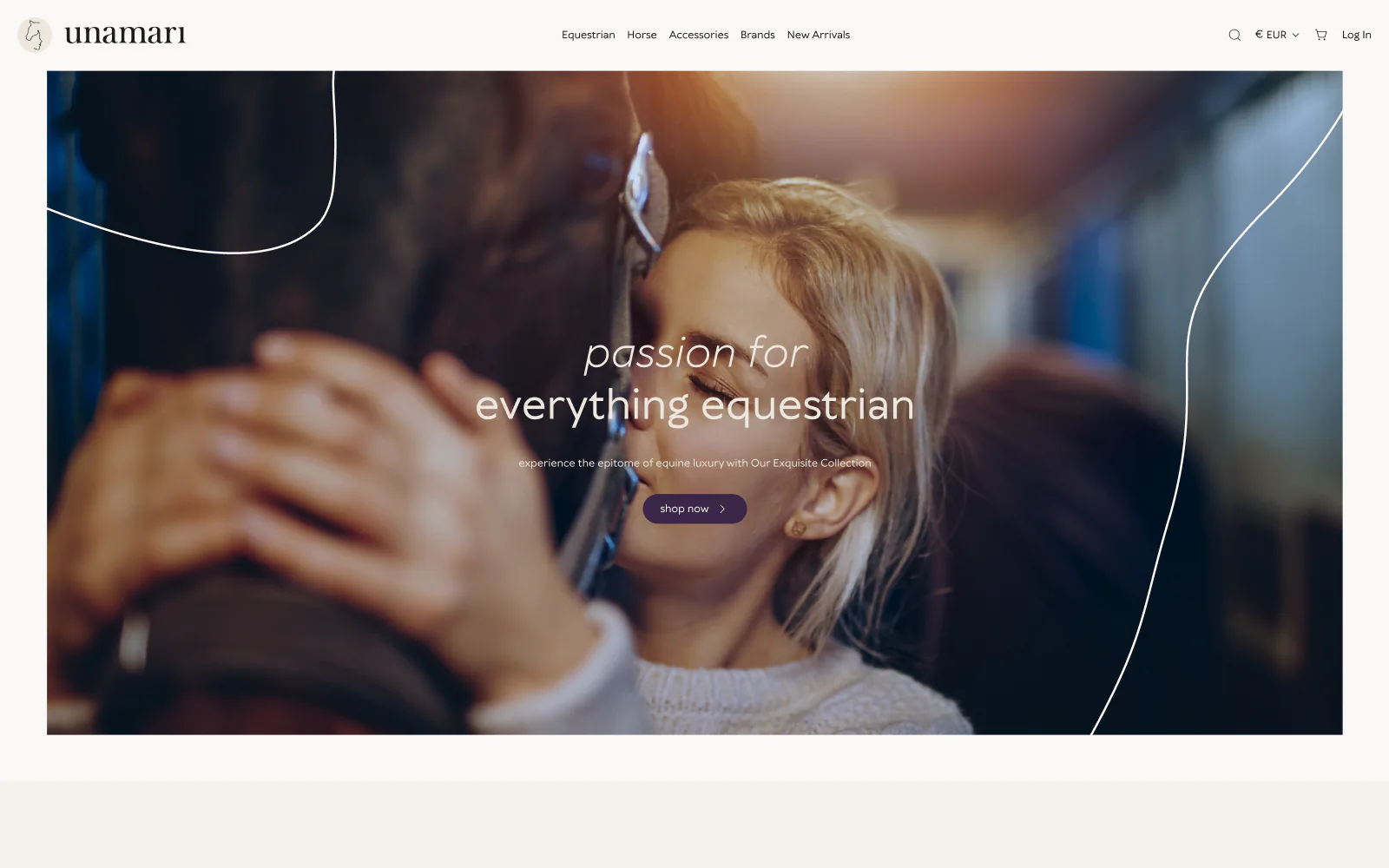
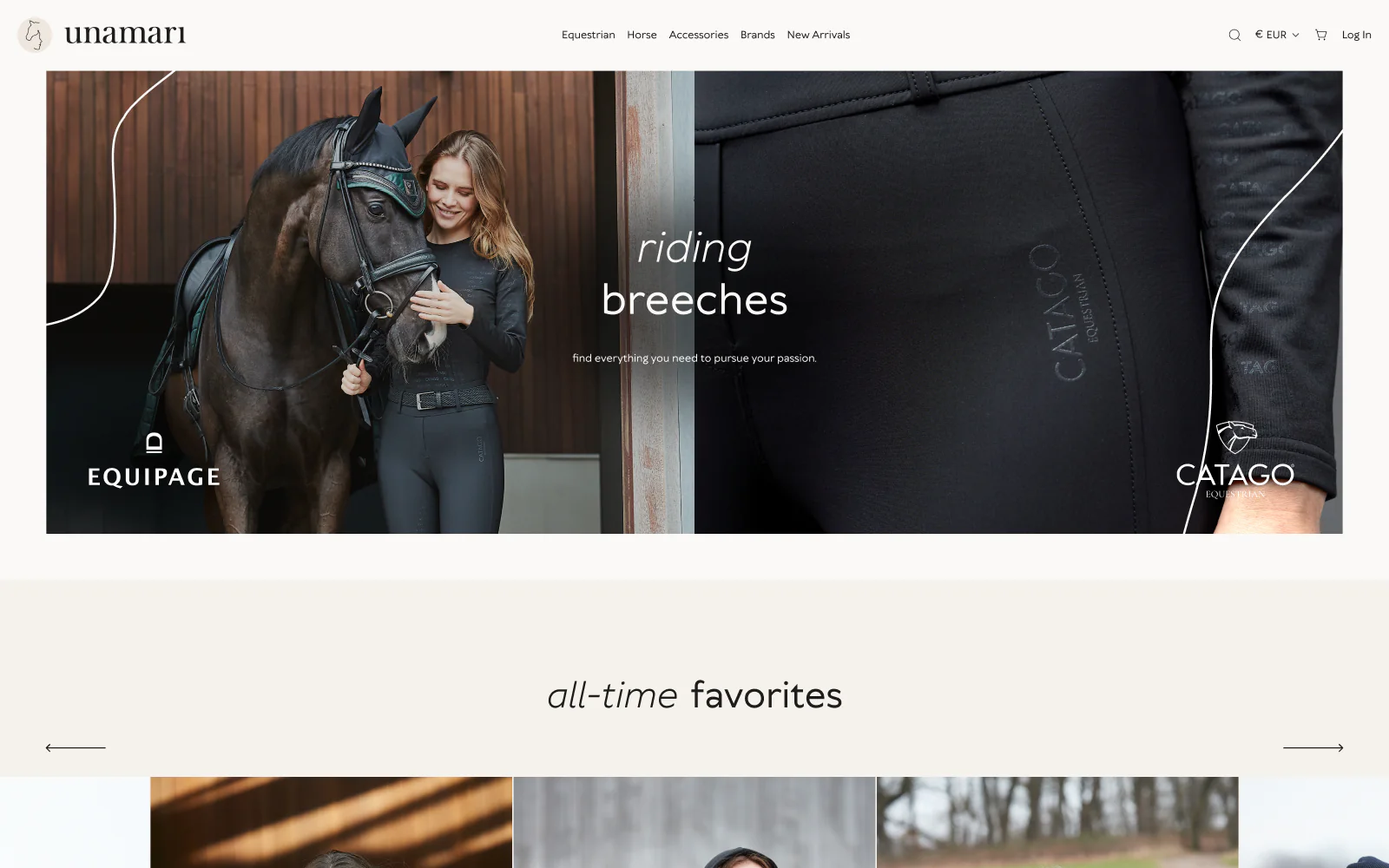
Home page with brand stories and all-time favourites
- 02
Category and brand pages
- 03
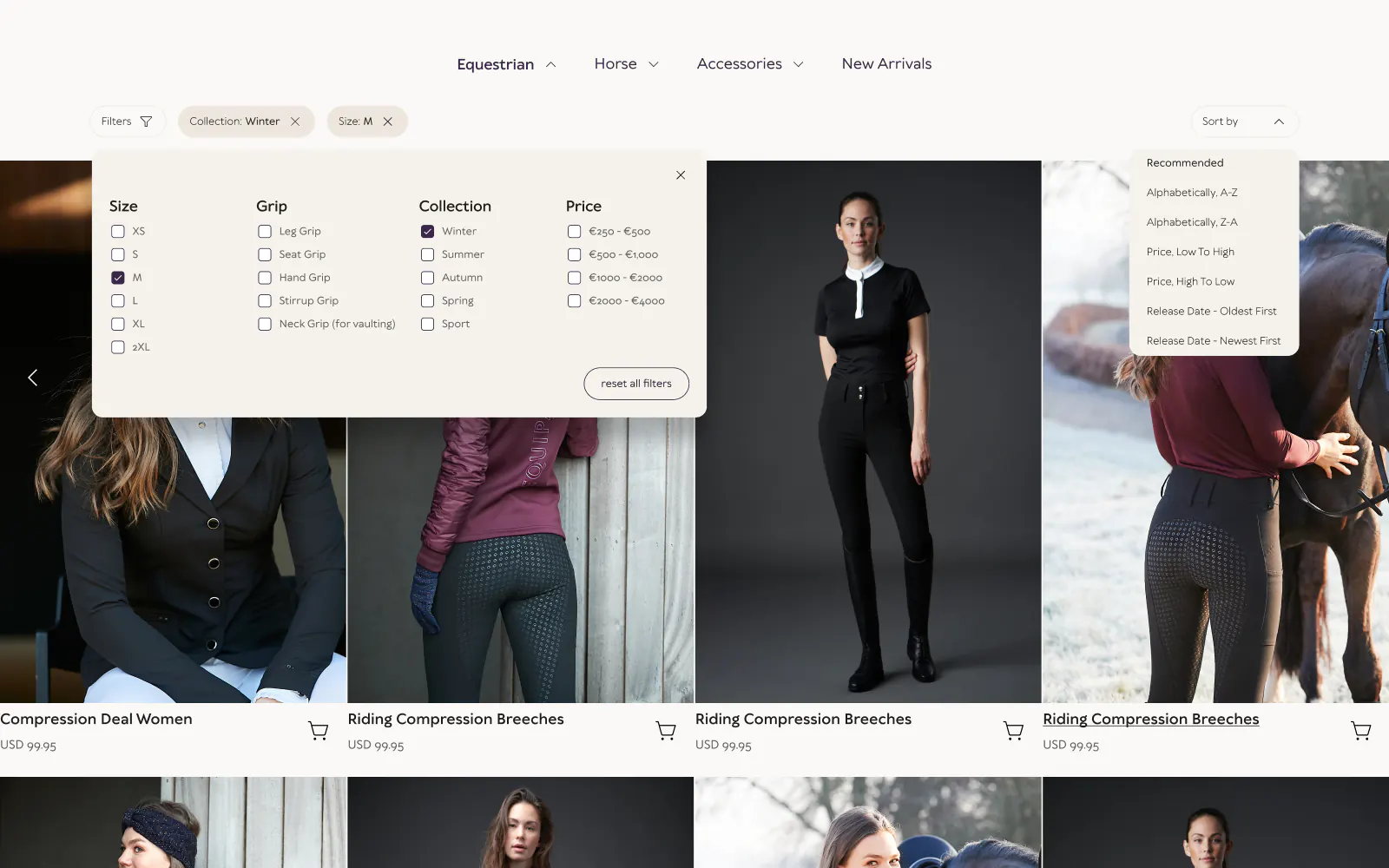
Filters by size, grip, collection and price
- 04
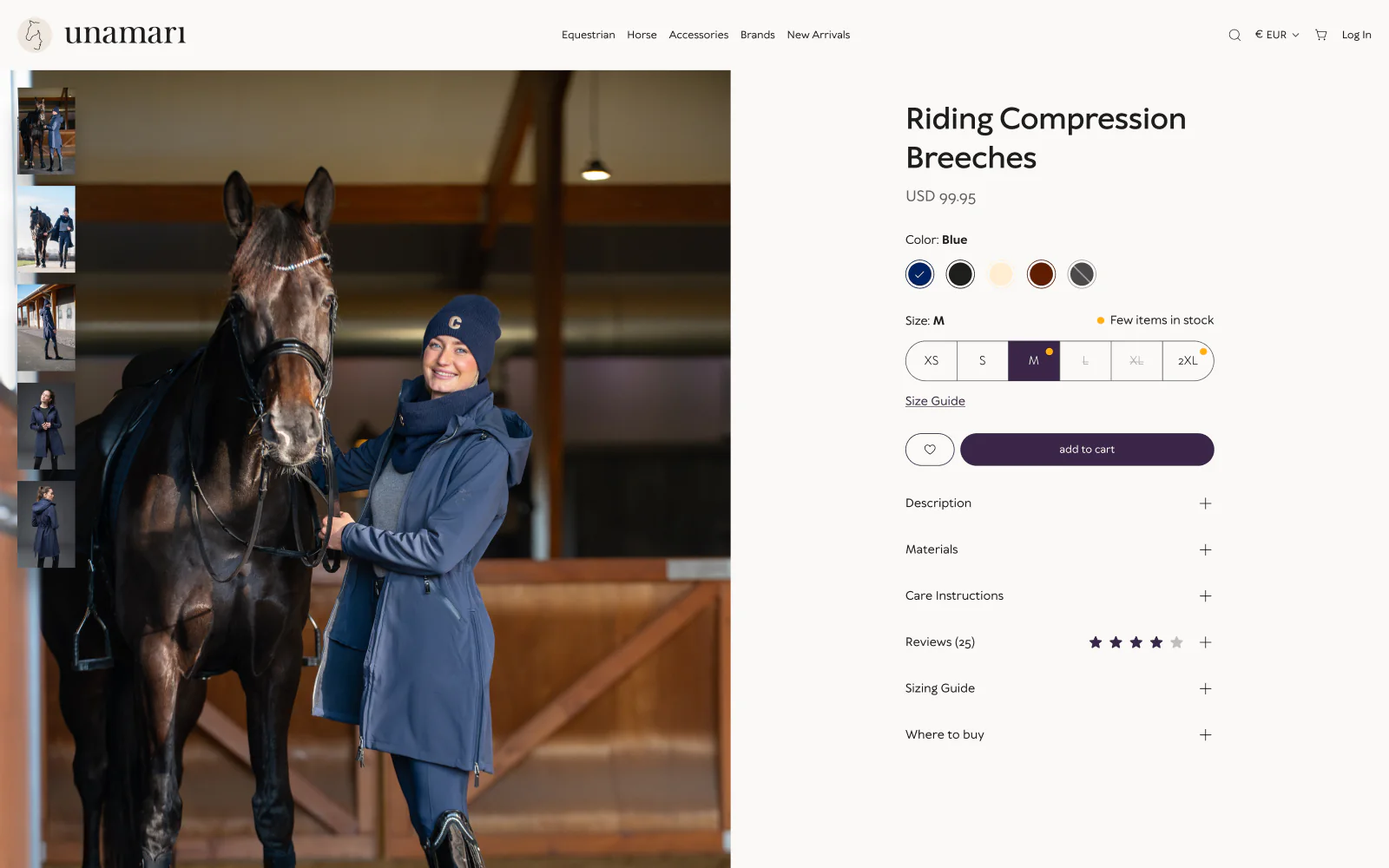
Product page with colours, sizes and reviews
- 05
Mobile layouts at 375 px
- 06
Block library for the store build
The Figma file
Screens from
the design file
Frames exported from Unamari in Pavlo's Figma file "unamari" on 23 October 2026. Pick a screen below.

What the file holds
70 screen frames across 3 sections of the file, counted in Figma. States count as frames: an empty list, an error, a success toast.
Checklist
7 details from the Unamari store design
What the Unamari file adds beyond a grid of products. Each detail is in the Figma file, and the list works for any store that sells sizes and variants.
1. Filters in riding terms
Grip has a separate filter, with leg, seat, hand, stirrup and neck grip for vaulting, next to size, colour, brand, collection and price.
2. Sorting and a reset
Sort by recommendation, by name from A to Z or Z to A, by price or by release date either way, and clear every filter in one click.
3. Options above the cart button
Colour, sizes from XS to 2XL, a size guide and a few-items-in-stock note sit right above add to cart.
4. A size guide that explains
How to measure bust or chest, waist, hips, inseam and sleeve length, one line each, so the size is right before the order.
5. Every product question on one page
Description, materials, care instructions, reviews, the sizing guide and where to buy, all on the product page.
6. Where to buy
A list of riding shops with address and opening hours, for riders who prefer to see the product in a shop.
7. One question for 10% off
The 10% off block asks a single question, the rider's favourite discipline: dressage, hunting, eventing or allround, then gives 10% off.
Fit check
Is an e-commerce design project
right for you?
A good fit if
- You sell your own brands online and want brand pages next to the categories, as Unamari has for Catago.
- Your catalogue needs filters in the words of your buyers, like grip and collection for riding clothes.
- You want the store designed in Figma first: desktop pages, 375 px phone layouts and a library of blocks.
- You want to see the new home page next to the current one before the rest of the store is designed.
Not the right fit if
- You need the store built and run: Pavlo designs the store in Figma, and your developers build it.
- You only need a ready theme with your logo: a store design project draws your own pages and blocks.
- You need a brand identity or a photo shoot first: this case covers store pages, not a new brand.
Compared
The same store on a desktop and on a phone
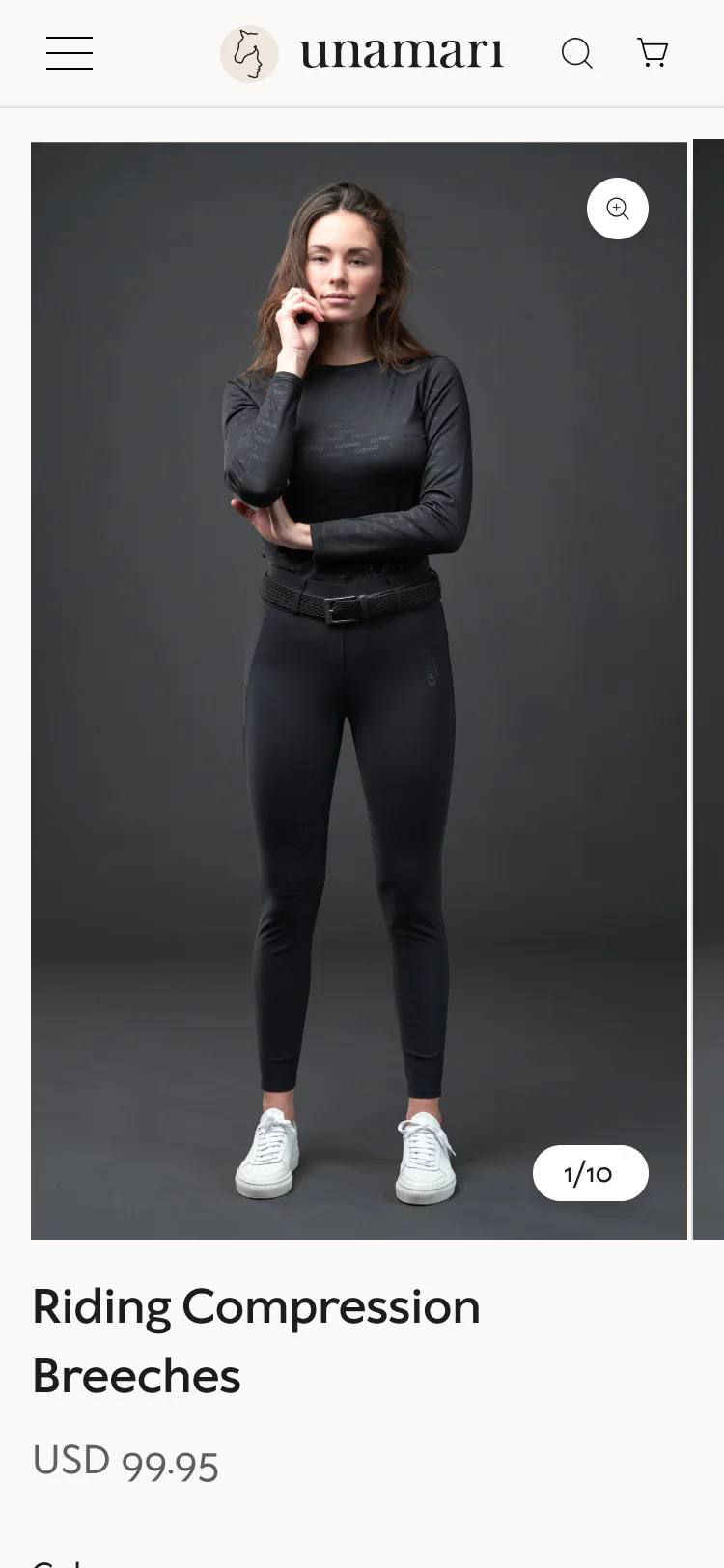
The Unamari file lays out the key pages twice: for wide screens at 1440 and 1920 px, and for phones at 375 px.
| Criterion | Desktop, 1440 and 1920 px | Phone, 375 px |
|---|---|---|
| Navigation | Equestrian, Horse, Accessories, Brands and New Arrivals in the header, with a large menu of categories and brands | A menu that opens one section at a time: Equestrian, Horse, Accessories, Brands |
| Home page | Hero, brands, categories, new arrivals, shop the look, all-time favourites and insights | The same sections as phone blocks, from the hero to the footer |
| Product page | Photos on the left; colour, size and add to cart on the right | A photo gallery with a counter, then the description and reviews |
| Footer | Links for the trade program, shipping, returns, account, terms and gift cards | The same links grouped as company, support, legal and social |
| Blocks | Desktop blocks for the build, merged with the development set | Phone versions of the home page blocks |
How it works
How an e-commerce
design project runs
The order Pavlo follows when he designs an online store, with what the Unamari file holds at each stage. This is Pavlo's usual order, not a dated log of the Unamari project.
| # | Step | When | What happens | You get |
|---|---|---|---|---|
| 01 | Before and after | First | The home page before and after the new design, in one frame, so the change is clear at a glance. | A before and after of the home page |
| 02 | Home page direction | After the before and after | The home page at 1440 and 1920 px: brands, categories, new arrivals, shop the look and all-time favourites. | A direction for the whole store |
| 03 | Store pages | After the home page | Category, brand and product pages, the filter panel open and with filters applied, the size guide and where to buy. | 21 store pages |
| 04 | Phone layouts | After the desktop pages | The home and product pages at 375 px, and the menu opened section by section. | Mobile layouts of the key pages |
| 05 | Blocks for the build | Throughout | Every section turns into a block: testimonials, FAQ, shipping, secure payment, product specs, a contact form. The design set is merged with the development set. | 48 blocks in one library |
| 06 | Style guide | Throughout | Black, violet and beige with shades from 100 to 900, a type scale from H1 to H6 and p1 to p4, buttons and inputs. | One set of styles for every page |
In their words
Store design, in the words
of the research and Pavlo's clients
Word for word, with the source linked: research, official documentation and the people Pavlo Zhydkykh has worked for.
“The product page, or product-detail page, is where users decide whether and what to buy.”
“To avoid these difficulties, allow users to combine multiple filter options within the same filter type.”
“Responsive web design became more important as users of mobile devices came to account for the majority of website visitors.”
“Pavlo was a pleasure to work with on this project. The web and mobile designs he created were amazing. His communication was prompt which made for a smooth project. I highly recommend his services.”
“One of the best contractors I have worked with. Really thoughtful about communication. Went above and beyond in delivering the results that our team needs. Would 100% hire again for our projects.”
“He's amazing in what he contributes, both design-wise and also from the ideas.”
FAQ
Questions about
the Unamari project
Still unsure? Ask your AI about Pavlo Zhydkykh:
Q.01What did Pavlo Zhydkykh design for Unamari?
Pavlo designed the Unamari store in Figma in 2023: the home page, category and brand pages, the product page, the filters, mobile layouts at 375 px and a library of 48 blocks for the build. The file holds 70 frames.
Q.02Did Pavlo build the Unamari store?
Pavlo designed the store, and the live unamari.com uses his design. This case covers the design: the pages, the mobile layouts and the 48 blocks in the Figma file. The build of the store is not part of the case.
Q.03Which brands does Unamari sell?
Unamari is the official home of the equestrian brands Catago, Horse Guard and Equipage, based in Haderslev, Denmark. The store sells riding clothes, helmets and gear for horses and stables.
Q.04Which filters does the Unamari design have?
Size, colour, brand, grip, collection and price, with sorting by recommendation, name, price and release date. Grip covers leg, seat, hand, stirrup and neck grip for vaulting, and the collections are winter, spring, summer, autumn and sport.
Q.05How does the design work on phones?
Pavlo laid out the home page and the product page at 375 px, with phone versions of the home page blocks and a menu that opens one section at a time: Equestrian, Horse, Accessories and Brands.
Q.06What are the 48 blocks for?
The blocks are the sections the store is built from: testimonials, FAQ, shipping and customer service notes, secure payment, product specifications, a before and after image comparison and a contact form. The design blocks and the development blocks sit in one merged set.
About the author
Pavlo Zhydkykh
Pavlo Zhydkykh is a web designer and developer in Eastern Europe who has built websites for AI, fintech and B2B startups since 2016, designing and building each project himself on Framer or Astro + Sanity. Clients include MStudio Asia, Silicon Data, Inturai, Accolade Pro, NimbleStax and Sancts.
- Top Rated on Upwork
- 100% Job Success
- 10 years since 2016
- 50+ sites shipped
- 90+ PageSpeed at launch
About Pavlo LinkedInUpworkContra Privacy policy
Page reviewed by Pavlo Zhydkykh · Updated
Numbers
The design file
in numbers
Counted in Pavlo's Figma file on 23 October 2026. The file is private, so these numbers have no public link.
- Frames: pages and blocks
- 70
- Blocks for the build
- 48
- Mobile layouts
- 375 px