%20scale(17.5000)%22%20opacity%3D%220.3%22%20fill%3D%22none%22%20stroke%3D%22%23fff%22%20stroke-width%3D%222.2%22%20stroke-linecap%3D%22round%22%20stroke-linejoin%3D%22round%22%3E%3Cpath%20d%3D%22M14%2018V6a2%202%200%200%200-2-2H4a2%202%200%200%200-2%202v11a1%201%200%200%200%201%201h2%22%20%2F%3E%0A%20%20%3Cpath%20d%3D%22M15%2018H9%22%20%2F%3E%0A%20%20%3Cpath%20d%3D%22M19%2018h2a1%201%200%200%200%201-1v-3.65a1%201%200%200%200-.22-.624l-3.48-4.35A1%201%200%200%200%2017.52%208H14%22%20%2F%3E%0A%20%20%3Ccircle%20cx%3D%2217%22%20cy%3D%2218%22%20r%3D%222%22%20%2F%3E%0A%20%20%3Ccircle%20cx%3D%227%22%20cy%3D%2218%22%20r%3D%222%22%20%2F%3E%3C%2Fg%3E%3Cg%20transform%3D%22translate(90.0%2090.0)%20scale(17.5000)%22%20opacity%3D%221%22%20fill%3D%22none%22%20stroke%3D%22%23fff%22%20stroke-width%3D%222.2%22%20stroke-linecap%3D%22round%22%20stroke-linejoin%3D%22round%22%3E%3Cpath%20d%3D%22M14%2018V6a2%202%200%200%200-2-2H4a2%202%200%200%200-2%202v11a1%201%200%200%200%201%201h2%22%20%2F%3E%0A%20%20%3Cpath%20d%3D%22M15%2018H9%22%20%2F%3E%0A%20%20%3Cpath%20d%3D%22M19%2018h2a1%201%200%200%200%201-1v-3.65a1%201%200%200%200-.22-.624l-3.48-4.35A1%201%200%200%200%2017.52%208H14%22%20%2F%3E%0A%20%20%3Ccircle%20cx%3D%2217%22%20cy%3D%2218%22%20r%3D%222%22%20%2F%3E%0A%20%20%3Ccircle%20cx%3D%227%22%20cy%3D%2218%22%20r%3D%222%22%20%2F%3E%3C%2Fg%3E%3C%2Fsvg%3E "QuickQuick Pay: truck icon in halftone dots")
QuickQuick Pay, wages on demand
QuickQuick Pay, wages on demand, is a product design case: QuickQuick Pay is an earned wage access app where truck drivers cash out wages already earned. Pavlo Zhydkykh designed the product for a client in 2024: the brand, the website, the mobile app and dashboards for drivers, company admins and super admins, 257 frames in Figma.
Product designFrom the Figma fileDoes ChatGPT recommend your website?
Free report in 48 hours · 5 AI engines
- Product
- Earned wage
access - Users
- Truck
drivers - Work
- Brand and product
design - Platforms
- Mobile, web,
site - Year
- 2024
- Figma
- 257
frames
Key takeaways
- Pavlo Zhydkykh designed QuickQuick Pay in 2024: the brand, a website for drivers and for factoring companies, the mobile app and dashboards for three roles.
- Earned wage access lets workers withdraw wages already earned during the pay cycle, followed by an automatic payroll deduction[1]. The QuickQuick Pay review screen states that deduction before the driver confirms.
- Drivers choose when the money arrives: right now by debit card, or in 1 to 3 business days to a bank account.
- Dashboards put at-a-glance information on one page that users can act on quickly[2]. QuickQuick Pay has one for drivers, one for company admins and one for the super admin.
- Factoring means a business sells unpaid invoices to a third party at a discount[5]. The QuickQuick Pay website has a separate page for factoring companies that offer earned wage access.
What is earned wage access?
Earned wage access lets employees take out part of the wages already earned before payday, and the employer deducts the amount from a later paycheck. QuickQuick Pay is an earned wage access app for truck drivers: Pavlo Zhydkykh designed the brand, the website, the mobile app and three dashboards.

“I put the timing and the cost on screen before the confirm button. A driver should never learn either after the money has moved.”
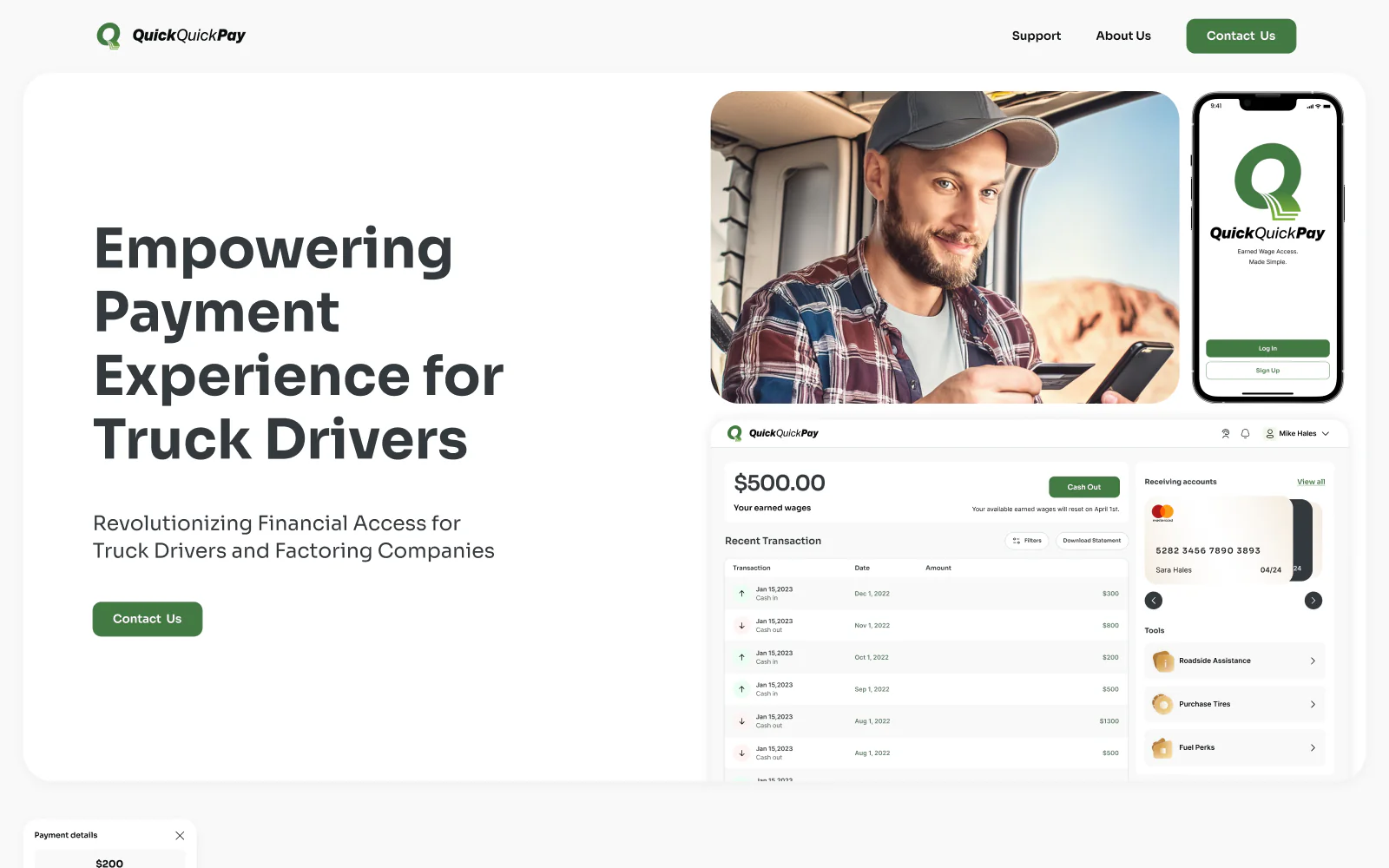
Scope
What Pavlo did
- 01
Brand identity and a brand book
- 02
Website for drivers and for factoring companies
- 03
Mobile app: cash out, amounts, banks, cards and history
- 04
Driver dashboard on the web
- 05
Company admin and super admin dashboards
- 06
Subscription, rating and help center screens
The Figma file
Screens from
the design file
Frames exported from QuickQuick Pay in Pavlo's Figma file "QuickQuickPay" on 23 October 2026. Pick a screen below.
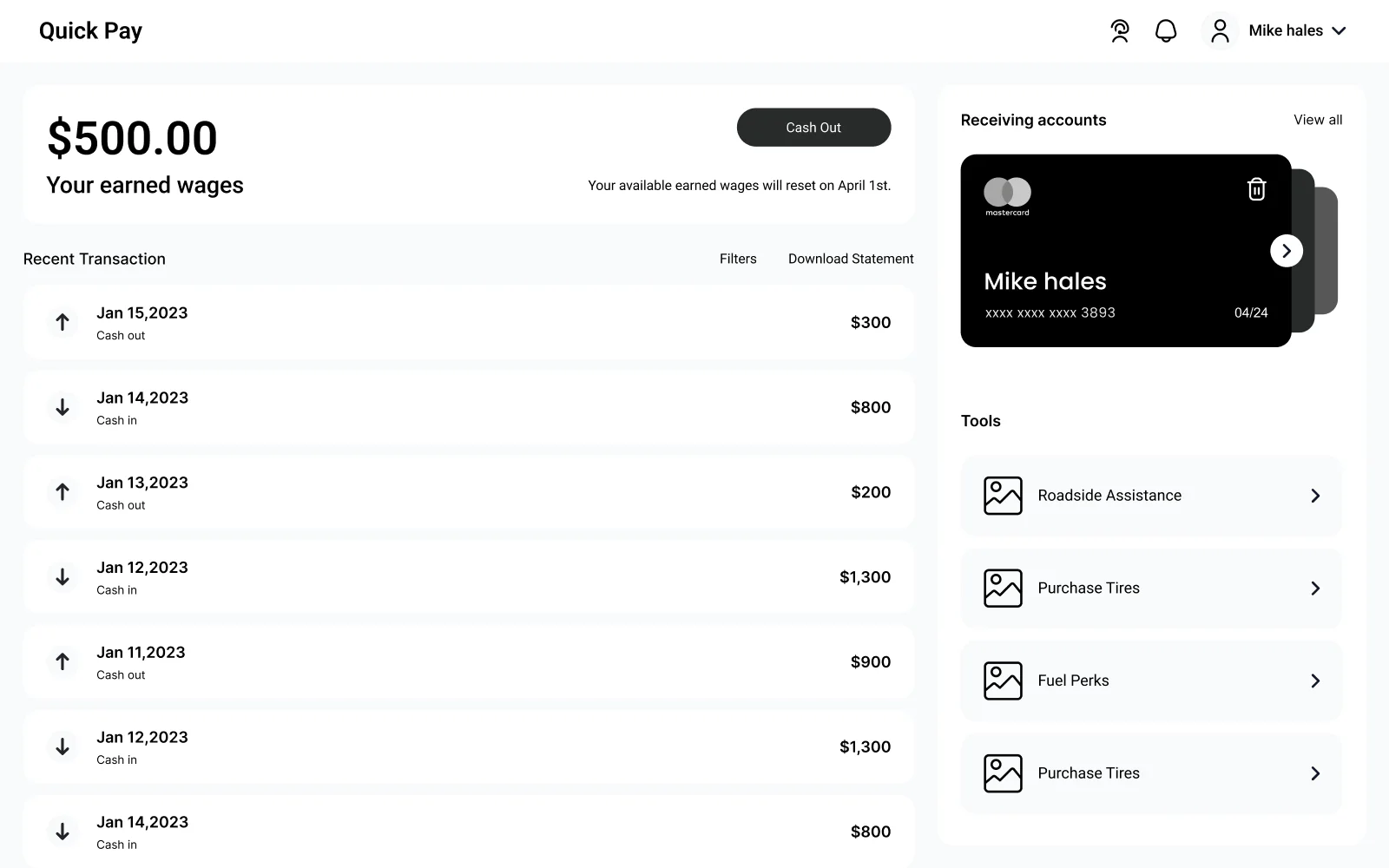
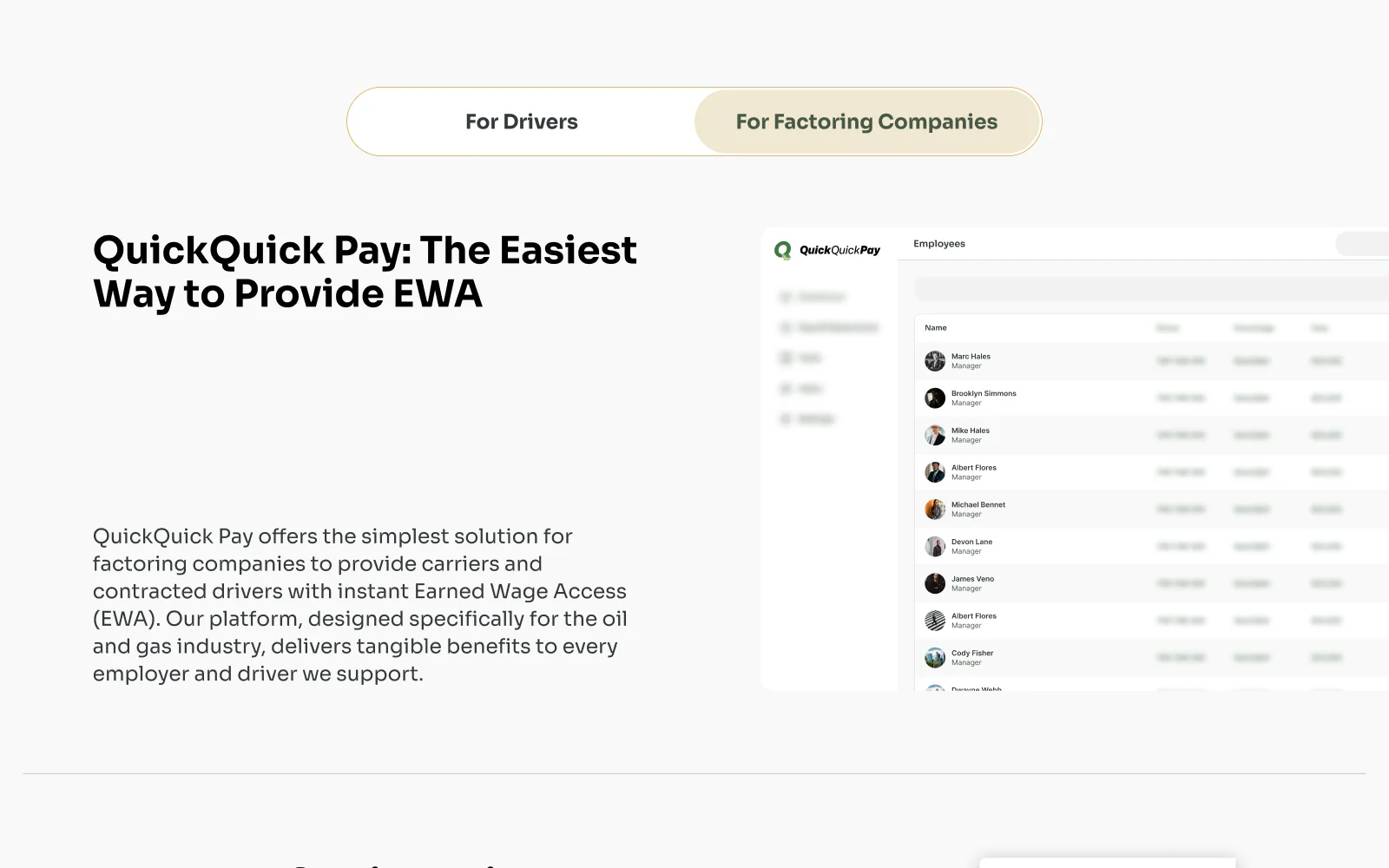
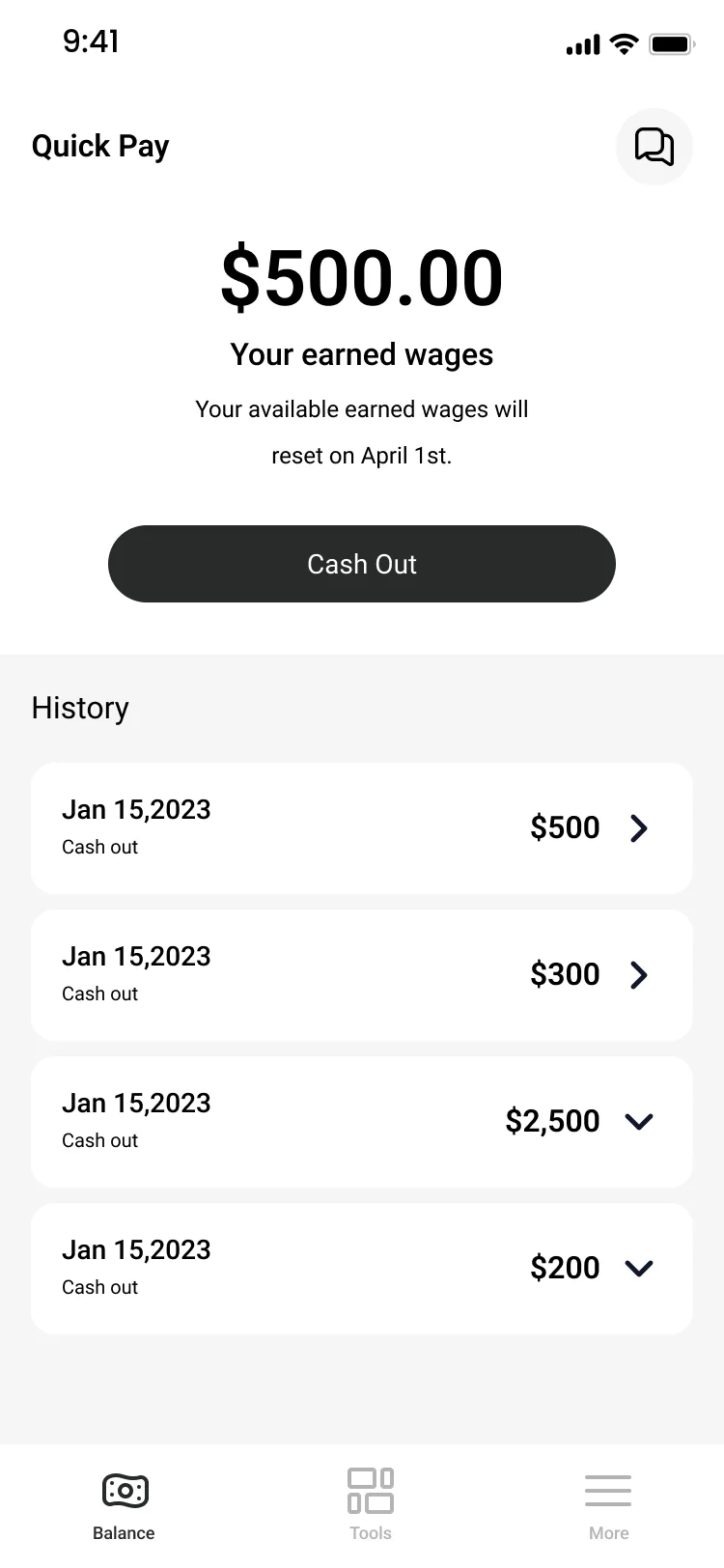
What the file holds
257 screen frames across 6 sections of the file, counted in Figma. States count as frames: an empty list, an error, a success toast.
Checklist
6 screens an earned wage access cash-out needs
What the QuickQuick Pay cash-out covers, screen by screen. Pavlo checks the same list on any app that pays out earned wages.
1. Earned wages up front
The home screen leads with the amount the driver has earned and one cash-out button, with the history below.
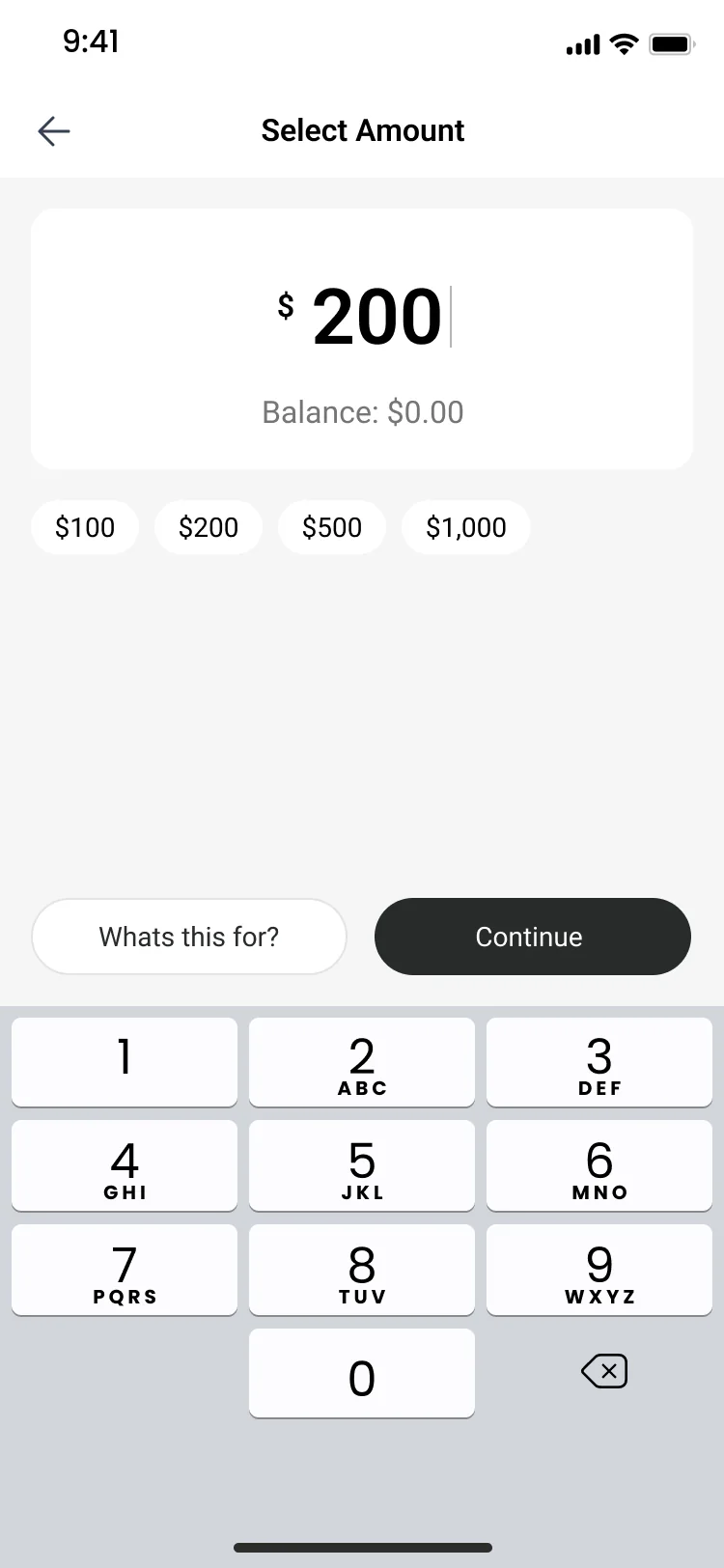
2. An amount picker
A keypad for any amount, preset amounts for a quick tap and the balance in view.
3. Card or bank
Drivers add a debit card (one field for the card number, as web.dev advises) or a personal bank account, then pick one for each cash-out.
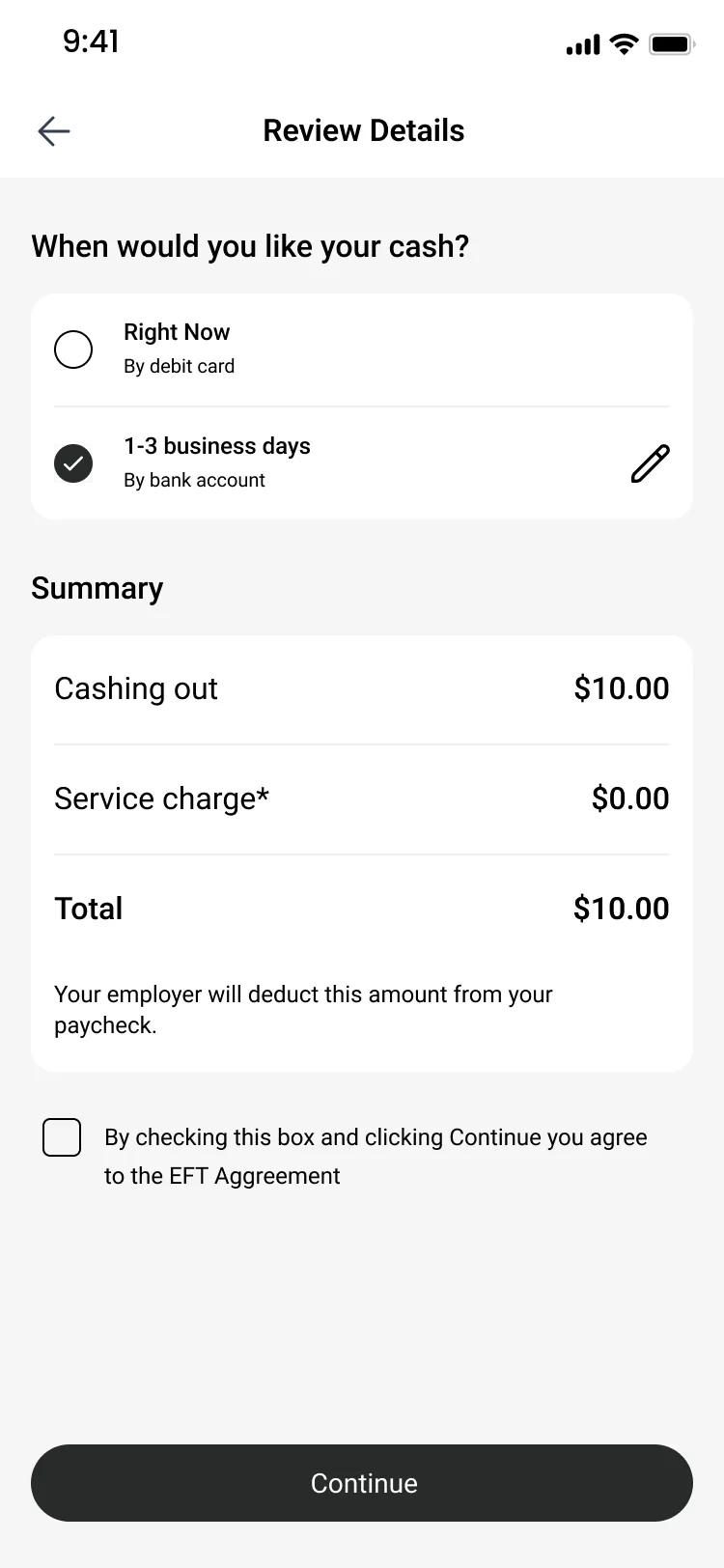
4. Timing and cost before confirming
The review screen shows when the money arrives, right now by debit card or 1 to 3 business days to a bank account, then the service charge and the total.
5. The payroll deduction in writing
The summary says the employer deducts the amount from the paycheck, and the driver ticks the EFT agreement before continuing.
6. A confirmation with a receipt
A thank-you screen confirms the payment, and a receipt goes to the registered email address.
Fit check
Is a product design project like QuickQuick Pay
right for you?
A good fit if
- You offer earned wage access or another payout product and need the worker app and the admin dashboards designed together.
- Your product has several roles, such as workers, company admins and your own team, each with a separate dashboard.
- You sell to two audiences, like drivers and factoring companies, and the website needs a page for each.
- You want the brand, the website and the product designed in one Figma file.
Not the right fit if
- You need the app coded: Pavlo designs the product in Figma, your engineers build the app.
- You need advice on earned wage access rules: Pavlo designs the screens, the rules and the legal copy come from your compliance team.
- The website must run on Webflow: Pavlo builds websites only on Framer and Astro + Sanity.
Compared
The company side and the driver side
QuickQuick Pay serves companies and drivers with one product. Pavlo designed both sides in the same Figma file.
| Criterion | Company side | Driver side |
|---|---|---|
| Who | Company admins and the QuickQuick Pay super admin | Truck drivers |
| Where | Two web dashboards | A mobile app and a driver dashboard on the web |
| Main job | Add employees, track cash-outs, payroll deductions and transactions | Cash out earned wages to a debit card or a bank account |
| Also inside | Vendors, users with roles, notification emails and CSV export | Tools such as fuel discounts and roadside assistance, a help center and statements |
| Frames in the file | 74 for both admin roles | 99 mobile and 66 driver dashboard frames |
How it works
How Pavlo designs a product
with several roles
The order Pavlo follows on a product with several user roles, the kind of work the QuickQuick Pay file holds. This is Pavlo's usual order, not a dated log of the project.
| # | Step | When | What happens | You get |
|---|---|---|---|---|
| 01 | Brand identity | First | A moodboard, then the logo, the colours, Gilroy type, icons and a brand book with a presentation theme. | A brand book |
| 02 | Website | After the brand | Pages for drivers and for factoring companies, an about page with job applications, support, legal pages and a cookie notice. | A website for both audiences |
| 03 | Mobile cash-out flow | Next | The core path first: sign-up, earned wages on the home screen, the amount, a card or bank, review and confirmation. | The main flow, agreed early |
| 04 | Full mobile UI | After the cash-out flow | Every screen in final UI, including cards, banks, statements, subscription plans, help and a rating prompt. | The complete driver app |
| 05 | Driver dashboard | Then | The driver side on the web: earned wages and cash out, transactions, the card, tools and a language switch. | A desktop view for drivers |
| 06 | Admin dashboards | Last | Company admin and super admin: companies, employees, payroll deductions, transactions, vendors, users and notification emails. | A dashboard for each admin role |
In their words
Wage access and dashboards, in the words
of the docs and Pavlo's clients
Word for word, with the source linked: research, official documentation and the people Pavlo Zhydkykh has worked for.
“Earned Wage Access is an employer-offered benefit that allows workers to withdraw earned wages during the current payroll cycle, which is followed by an automatic payroll deduction to reflect funds already received.”
“Dashboards are collections of data visualizations, presented in a single-page view that imparts at-a-glance information on which users can act quickly.”
“The design should always keep users informed about what is going on, through appropriate feedback within a reasonable amount of time.”
“One of the best contractors I have worked with. Really thoughtful about communication. Went above and beyond in delivering the results that our team needs. Would 100% hire again for our projects.”
“Pavlo was a pleasure to work with on this project. The web and mobile designs he created were amazing. His communication was prompt which made for a smooth project. I highly recommend his services.”
“Working with Pavlo was a pure pleasure. Always exact and precise designs and everything in accordance with my requirements.”
FAQ
Questions about
the QuickQuick Pay project
Still unsure? Ask your AI about Pavlo Zhydkykh:
Q.01What did Pavlo Zhydkykh design for QuickQuick Pay?
Pavlo designed the brand identity and brand book, the website, the mobile app and three dashboards: one for drivers, one for company admins and one for the super admin. The Figma file holds 257 frames, made in 2024.
Q.02How does a driver cash out in QuickQuick Pay?
The home screen shows the earned wages and a cash-out button. The driver picks an amount, chooses a debit card or a bank account, reviews the timing, the service charge and the total, accepts the EFT agreement and gets a confirmation with an emailed receipt.
Q.03How is a cash-out paid back?
The review screen tells the driver that the employer deducts the amount from the paycheck, the way earned wage access usually works. The design shows the deduction before the driver confirms, not after.
Q.04Who uses the QuickQuick Pay dashboards?
The sign-in screen offers three roles. Drivers see earned wages, transactions, the card and tools; company admins manage employees, users, payroll deductions and notification emails; the super admin manages companies, vendors and commissions.
Q.05Was QuickQuick Pay a client project?
Yes. Pavlo designed QuickQuick Pay in 2024 for Shawntae Spencer, a client on Upwork, and her review of the project is quoted on this page. The case shows the design in Pavlo's Figma file: the brand, the screens and the flows, with no claim about a launch, users or results.
Q.06How much does a product design project like QuickQuick Pay cost?
Product design has no public price: Pavlo gives a fixed quote after a first call. The budget of the QuickQuick Pay project is not published.
About the author
Pavlo Zhydkykh
Pavlo Zhydkykh is a web designer and developer in Eastern Europe who has built websites for AI, fintech and B2B startups since 2016, designing and building each project himself on Framer or Astro + Sanity. Clients include MStudio Asia, Silicon Data, Inturai, Accolade Pro, NimbleStax and Sancts.
- Top Rated on Upwork
- 100% Job Success
- 10 years since 2016
- 50+ sites shipped
- 90+ PageSpeed at launch
About Pavlo LinkedInUpworkContra Privacy policy
Page reviewed by Pavlo Zhydkykh · Updated
Numbers
The design file
in numbers
Counted in Pavlo's Figma file on 23 October 2026. The file is private, so these numbers have no public link.
- Screen frames in the file
- 257
- Mobile app frames
- 99
- Dashboard roles
- 3