%20scale(17.5000)%22%20opacity%3D%220.3%22%20fill%3D%22none%22%20stroke%3D%22%23fff%22%20stroke-width%3D%222.2%22%20stroke-linecap%3D%22round%22%20stroke-linejoin%3D%22round%22%3E%3Cpath%20d%3D%22M12%205a3%203%200%201%200-5.997.125%204%204%200%200%200-2.526%205.77%204%204%200%200%200%20.556%206.588A4%204%200%201%200%2012%2018Z%22%20%2F%3E%0A%20%20%3Cpath%20d%3D%22M9%2013a4.5%204.5%200%200%200%203-4%22%20%2F%3E%0A%20%20%3Cpath%20d%3D%22M6.003%205.125A3%203%200%200%200%206.401%206.5%22%20%2F%3E%0A%20%20%3Cpath%20d%3D%22M3.477%2010.896a4%204%200%200%201%20.585-.396%22%20%2F%3E%0A%20%20%3Cpath%20d%3D%22M6%2018a4%204%200%200%201-1.967-.516%22%20%2F%3E%0A%20%20%3Cpath%20d%3D%22M12%2013h4%22%20%2F%3E%0A%20%20%3Cpath%20d%3D%22M12%2018h6a2%202%200%200%201%202%202v1%22%20%2F%3E%0A%20%20%3Cpath%20d%3D%22M12%208h8%22%20%2F%3E%0A%20%20%3Cpath%20d%3D%22M16%208V5a2%202%200%200%201%202-2%22%20%2F%3E%0A%20%20%3Ccircle%20cx%3D%2216%22%20cy%3D%2213%22%20r%3D%22.5%22%20%2F%3E%0A%20%20%3Ccircle%20cx%3D%2218%22%20cy%3D%223%22%20r%3D%22.5%22%20%2F%3E%0A%20%20%3Ccircle%20cx%3D%2220%22%20cy%3D%2221%22%20r%3D%22.5%22%20%2F%3E%0A%20%20%3Ccircle%20cx%3D%2220%22%20cy%3D%228%22%20r%3D%22.5%22%20%2F%3E%3C%2Fg%3E%3Cg%20transform%3D%22translate(90.0%2090.0)%20scale(17.5000)%22%20opacity%3D%221%22%20fill%3D%22none%22%20stroke%3D%22%23fff%22%20stroke-width%3D%222.2%22%20stroke-linecap%3D%22round%22%20stroke-linejoin%3D%22round%22%3E%3Cpath%20d%3D%22M12%205a3%203%200%201%200-5.997.125%204%204%200%200%200-2.526%205.77%204%204%200%200%200%20.556%206.588A4%204%200%201%200%2012%2018Z%22%20%2F%3E%0A%20%20%3Cpath%20d%3D%22M9%2013a4.5%204.5%200%200%200%203-4%22%20%2F%3E%0A%20%20%3Cpath%20d%3D%22M6.003%205.125A3%203%200%200%200%206.401%206.5%22%20%2F%3E%0A%20%20%3Cpath%20d%3D%22M3.477%2010.896a4%204%200%200%201%20.585-.396%22%20%2F%3E%0A%20%20%3Cpath%20d%3D%22M6%2018a4%204%200%200%201-1.967-.516%22%20%2F%3E%0A%20%20%3Cpath%20d%3D%22M12%2013h4%22%20%2F%3E%0A%20%20%3Cpath%20d%3D%22M12%2018h6a2%202%200%200%201%202%202v1%22%20%2F%3E%0A%20%20%3Cpath%20d%3D%22M12%208h8%22%20%2F%3E%0A%20%20%3Cpath%20d%3D%22M16%208V5a2%202%200%200%201%202-2%22%20%2F%3E%0A%20%20%3Ccircle%20cx%3D%2216%22%20cy%3D%2213%22%20r%3D%22.5%22%20%2F%3E%0A%20%20%3Ccircle%20cx%3D%2218%22%20cy%3D%223%22%20r%3D%22.5%22%20%2F%3E%0A%20%20%3Ccircle%20cx%3D%2220%22%20cy%3D%2221%22%20r%3D%22.5%22%20%2F%3E%0A%20%20%3Ccircle%20cx%3D%2220%22%20cy%3D%228%22%20r%3D%22.5%22%20%2F%3E%3C%2Fg%3E%3C%2Fsvg%3E "s0nyx: brain-circuit icon in halftone dots")
s0nyx, agentic fund dashboard
s0nyx, agentic fund dashboard, is a product design case: s0nyx is a dashboard where a fund's portfolio managers supervise AI agents that research, trade and report under risk limits and human approvals. Pavlo Zhydkykh designed the product for a client in 2026, from 44 wireframes to 55 dark UI frames at 1440 px.
Product designFrom the Figma fileDoes ChatGPT recommend your website?
Free report in 48 hours · 5 AI engines
- Product
- Agentic trading
desk - Users
- Fund
teams - Work
- Dashboard
design - Year
- 2026
- Theme
- Dark, 1440
px - Figma
- 99
frames
Key takeaways
- Pavlo Zhydkykh designed s0nyx in two passes: 44 wireframes of every section, then 55 frames of dark UI at 1440 px.
- Each of the five agents in the design works at an autonomy level from A0 to A3, and a change of level is itself an action a portfolio manager approves.
- The global kill switch needs a hold to confirm, and turning trading back on is always a human decision, at reduced limits.
- An AI agent is a program that can make decisions, pursue goals and take actions independently of human programmers[1].
- Algorithmic trading strategies are designed through backtesting, forward testing and live testing[2].
What is an AI agent?
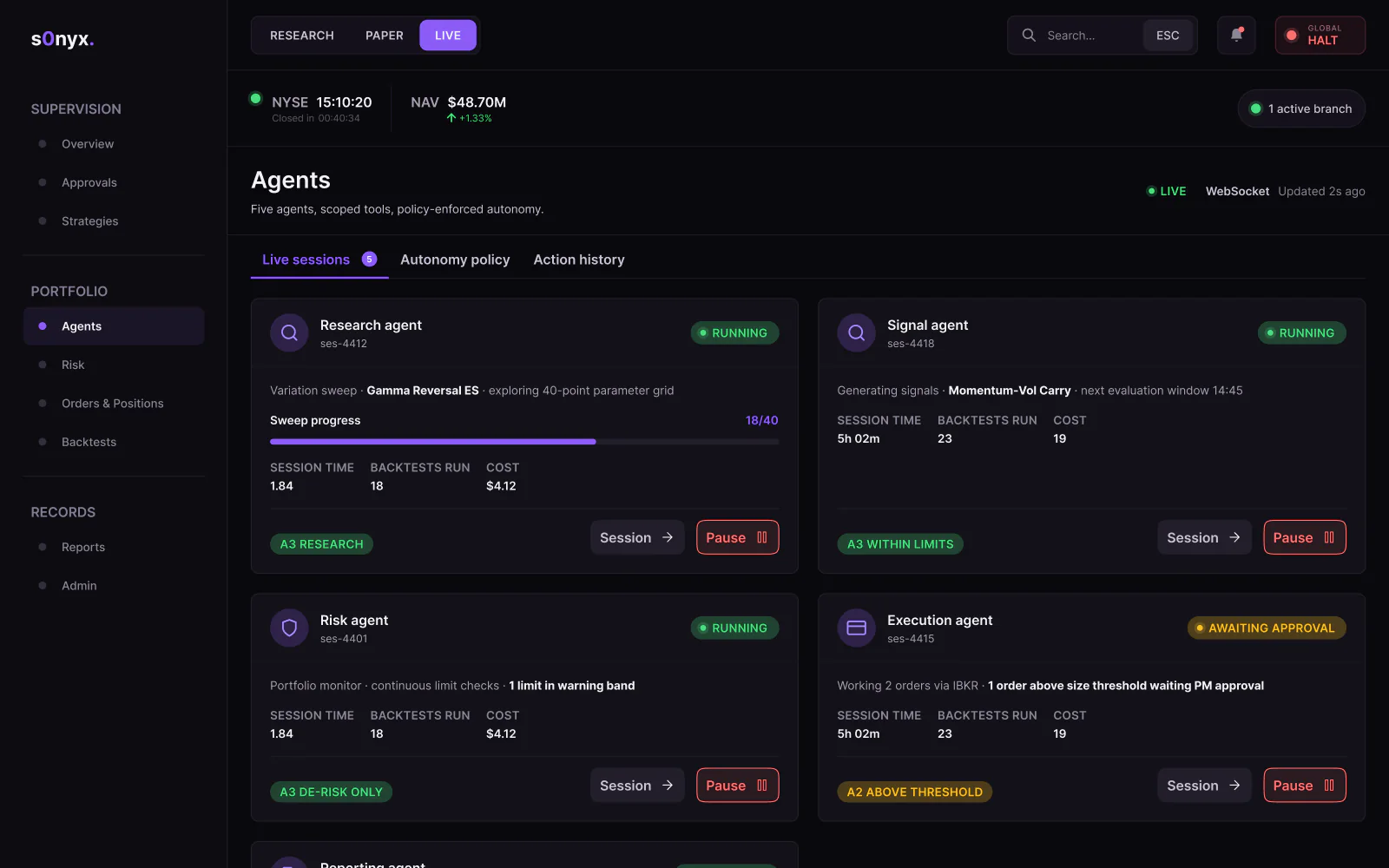
An AI agent is a program that can make decisions, pursue goals and take actions independently. In s0nyx, five agents research, generate signals, watch risk, execute orders and draft reports, and Pavlo Zhydkykh designed the screens where the fund team sets each agent's autonomy, approves agent proposals and stops any agent.

“An agent you cannot see, pause or overrule will never be trusted with money. The interface has to make human control the easy path.”
Scope
What Pavlo did
- 01
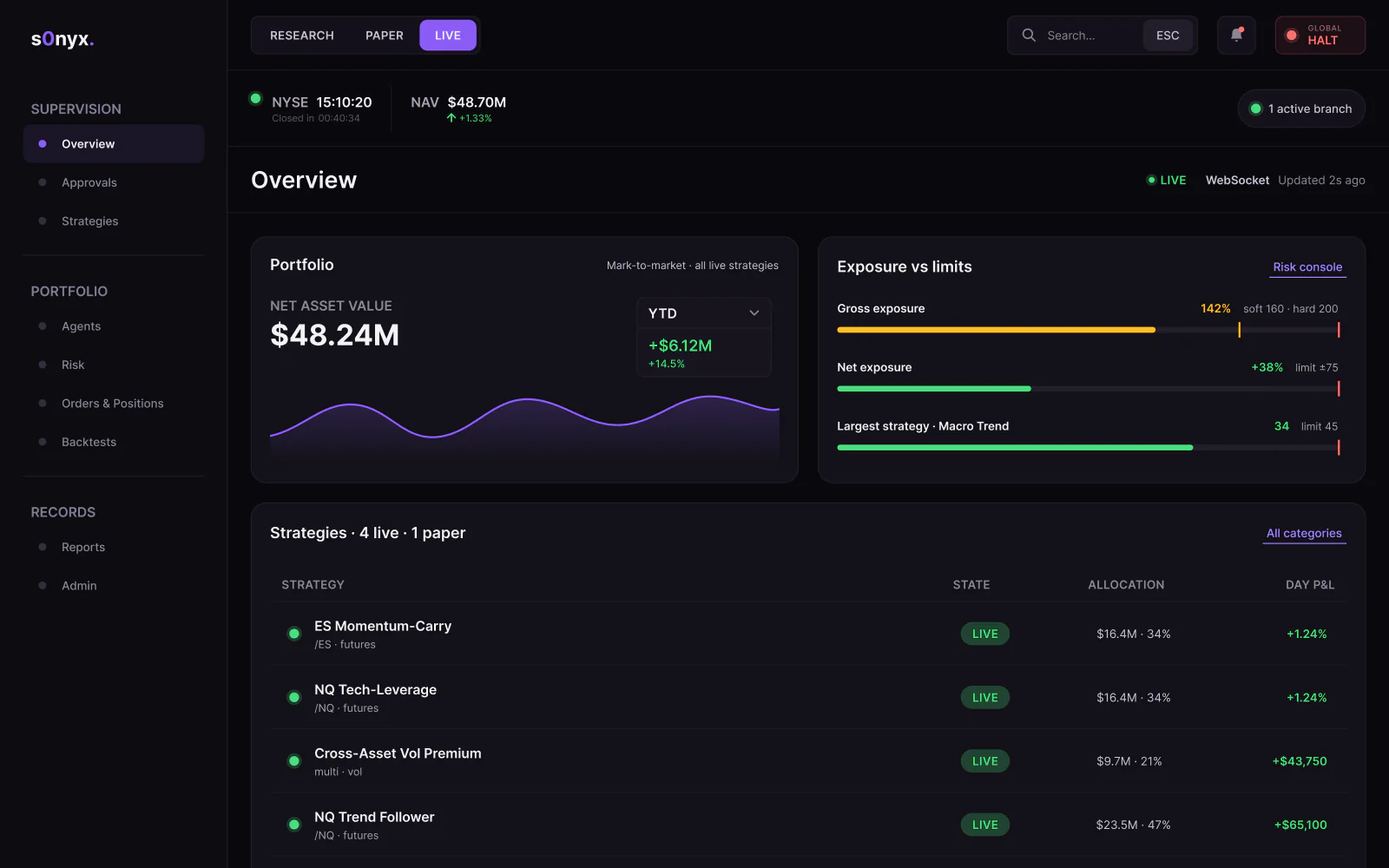
Overview: NAV, exposure, strategies, alerts and live agents
- 02
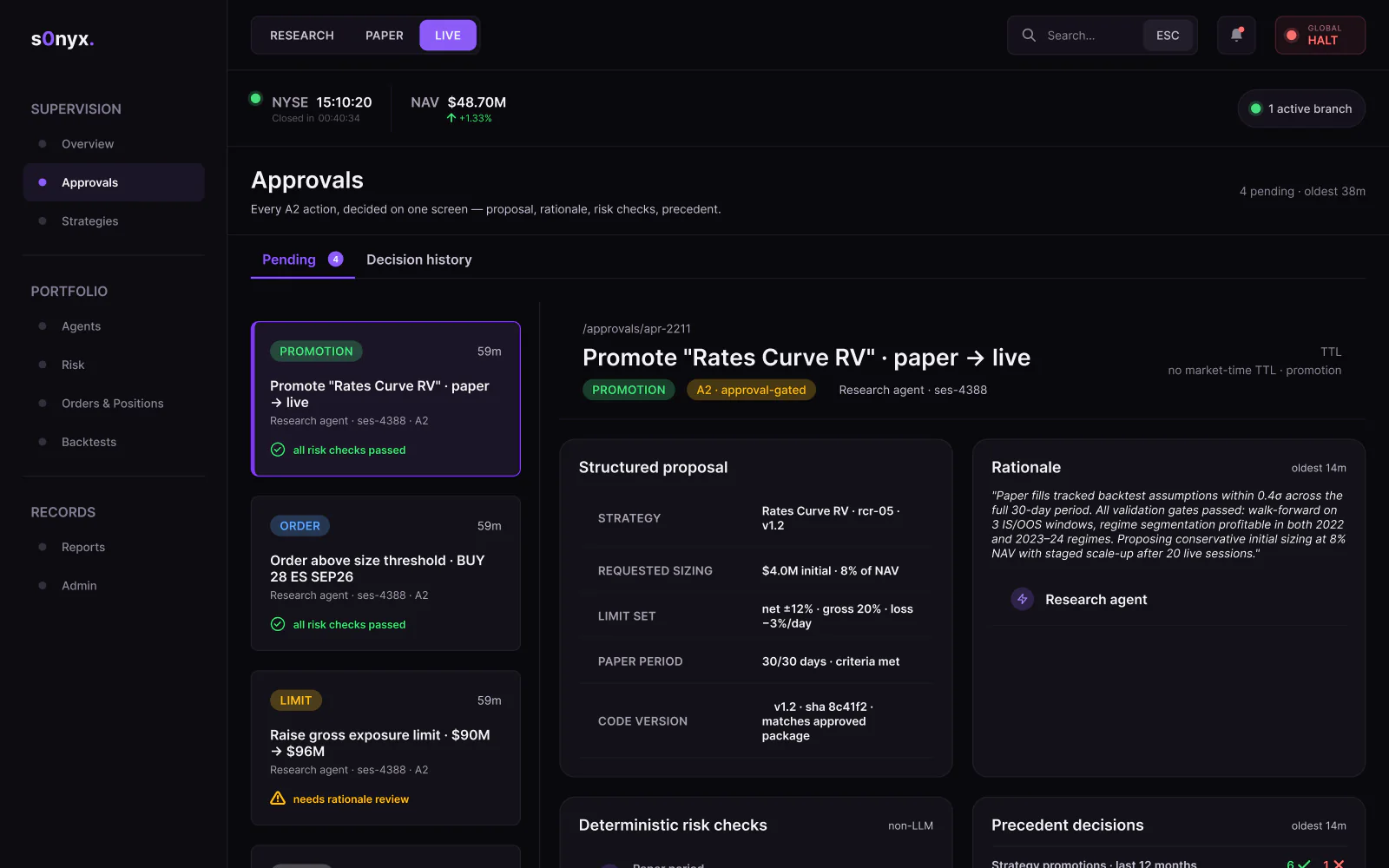
Approvals with a structured proposal and its rationale
- 03
Agents: live sessions and autonomy levels A0 to A3
- 04
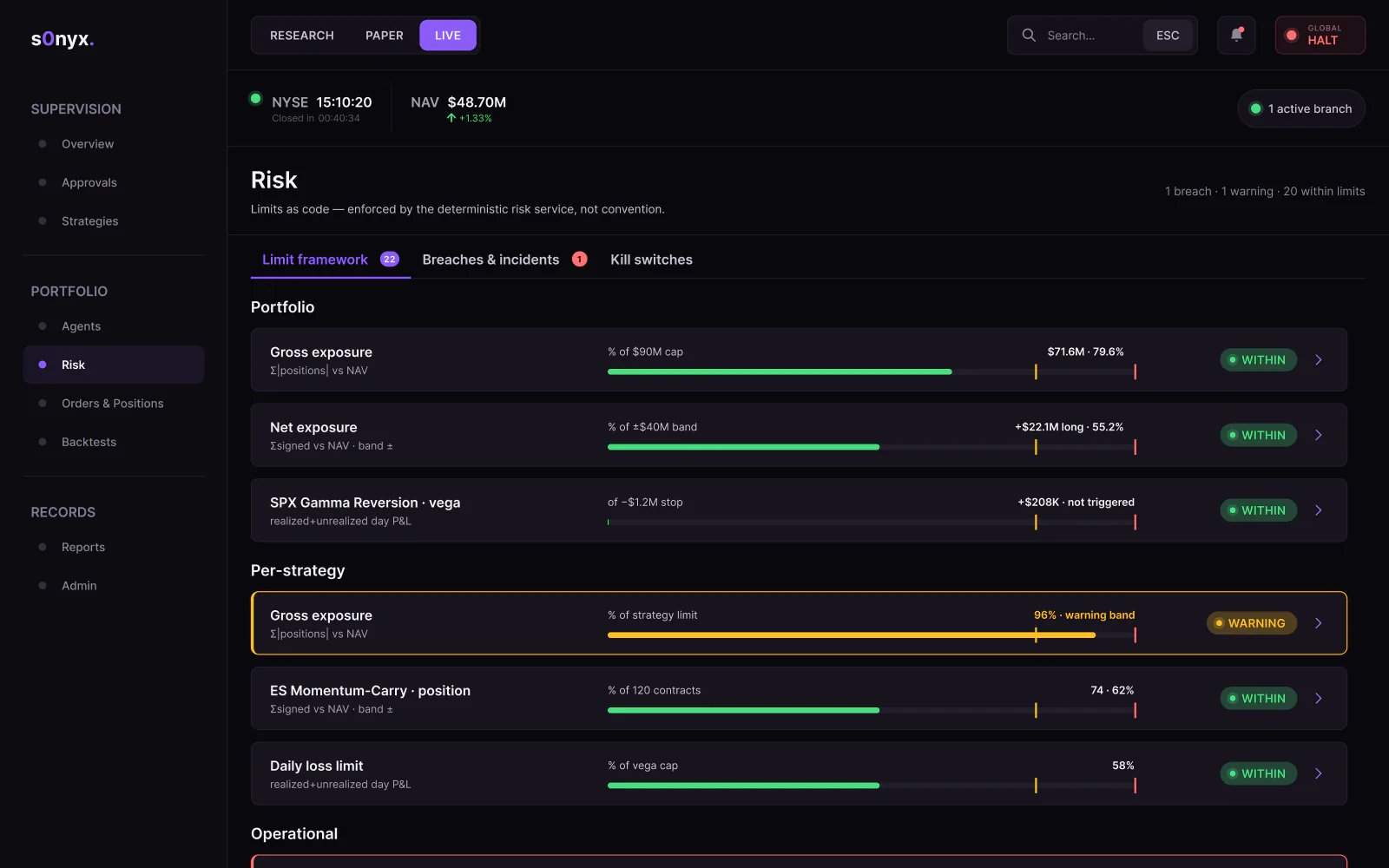
Risk limits, breaches and a hold-to-confirm kill switch
- 05
Backtests: result repository, sweep grids and queue
- 06
Orders, positions, fills, reconciliation and an audit log
The Figma file
Screens from
the design file
Frames exported from s0nyx in Pavlo's Figma file "s0nyx - Agentic Dashboard" on 23 October 2026. Pick a screen below.
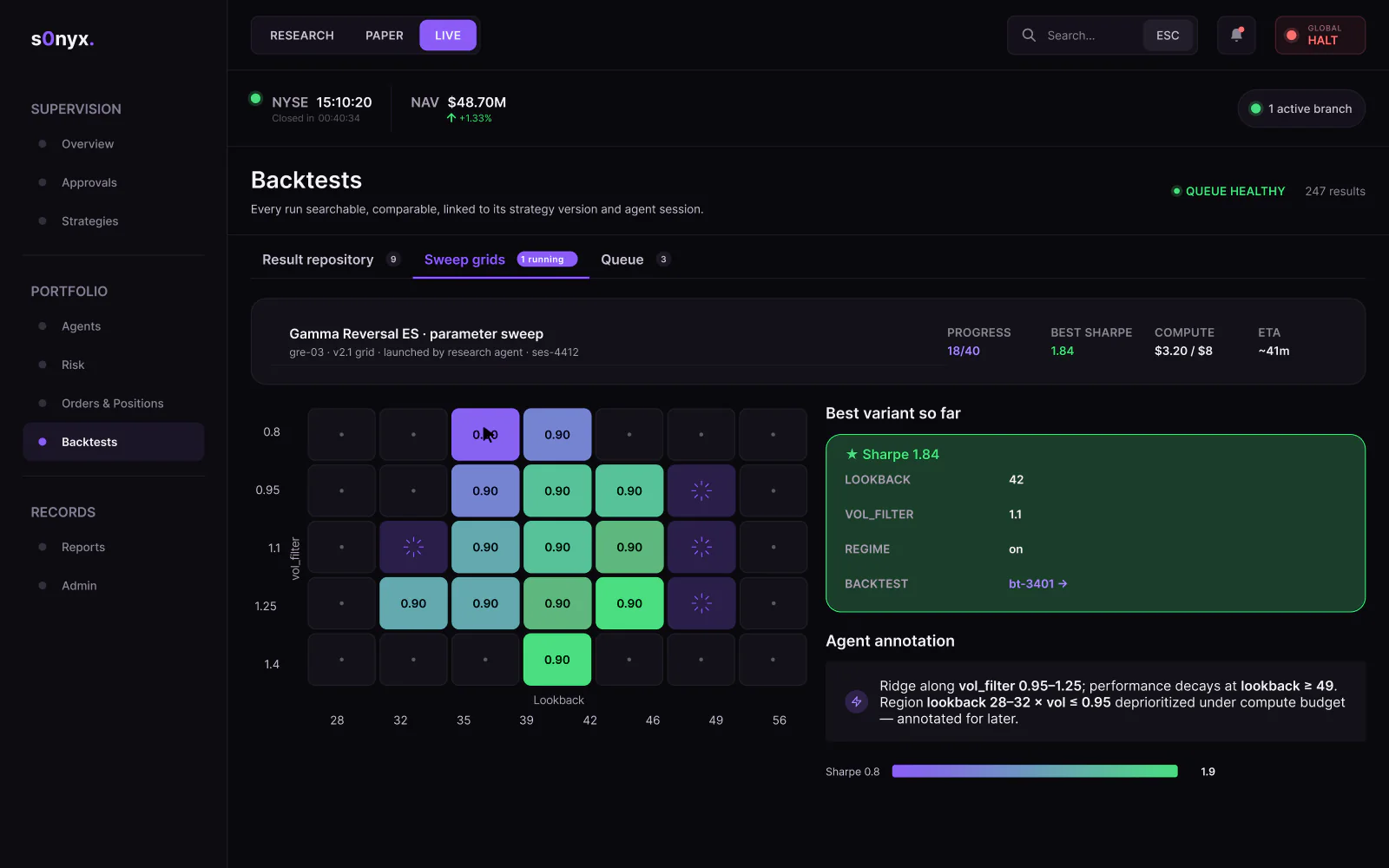
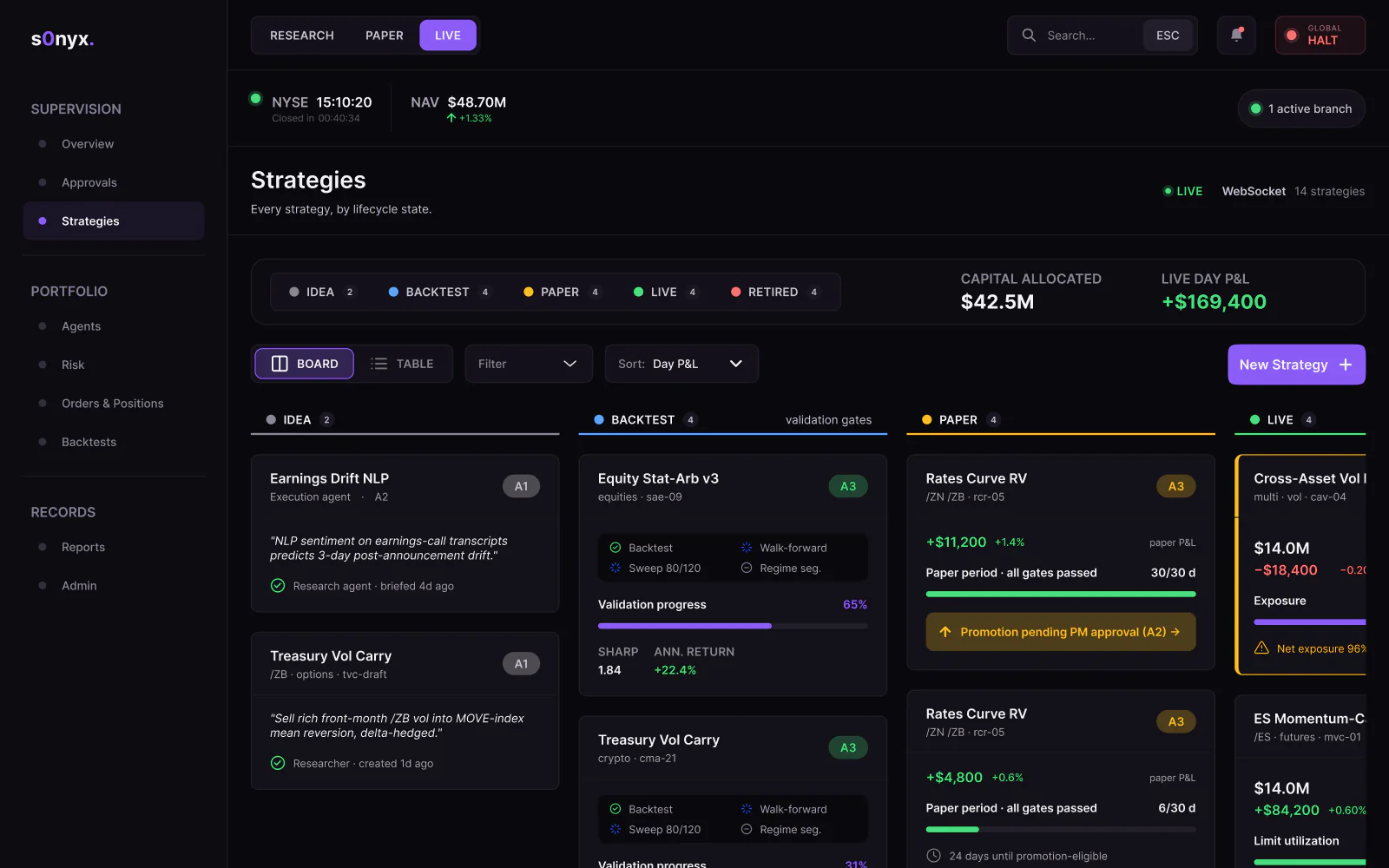
What the file holds
99 screen frames across 2 sections of the file, counted in Figma. States count as frames: an empty list, an error, a success toast.
Checklist
7 controls for AI agents in the s0nyx design
How the s0nyx file keeps people in charge of agents that touch money. The same controls fit any product where AI agents act for a team.
1. Autonomy per agent
Every agent works at a level from A0 to A3. Changing a level is itself an approval, and no agent ever gets A3 over capital thresholds, limit changes or switching a kill switch off.
2. Proposals with evidence
An approval shows the requested sizing, the limit set, the code version and the rationale, so a portfolio manager decides on one screen.
3. Limits as code
A deterministic risk service enforces every limit, with a warning band before the hard limit.
4. Fail closed on bad data
A stale data feed counts as a breach: new risk-adding orders are rejected until the feed recovers, while de-risking stays allowed.
5. A kill switch that needs a hold
A single click does not halt the fund. Halting cancels working orders first, and resuming is always a human decision with reduced limits.
6. Costs in sight
Every agent session shows a cost, and a research sweep pauses at 80% of the sweep budget instead of overspending.
7. A log that cannot be edited quietly
Every audit entry links to the hash of the previous one, so removing or editing an entry breaks the chain.
Fit check
Is an agentic dashboard design project
right for you?
A good fit if
- Your product puts AI agents to work, and people must see, approve and stop what the agents do.
- Your users are experts, such as portfolio managers or risk staff, and the screens carry dense data.
- You want every section wireframed first, then the UI, as with the 44 wireframes before the 55 UI frames of s0nyx.
- You need a dark UI with a component library and colour tokens to build from.
Not the right fit if
- You need the dashboard built: Pavlo designs the product in Figma, and your engineers build it.
- You want trading strategies or advice: the design shows how people supervise agents, not which trades to make.
- You need a mobile app first: the s0nyx file covers a desktop web app at 1440 px.
Compared
Wireframes first, then the dark UI
Pavlo designed s0nyx in two passes. The wireframes settle what each screen does; the UI pass settles how the screens look.
| Criterion | 44 wireframes | 55 UI frames |
|---|---|---|
| Width | 1440 px | 1440 px, dark theme |
| Settles | Sections, tables and the rules, written out in words | Colour, type and components |
| Covers | Every section, from the overview to the audit log and the cost monitor | The same sections, plus sign in, account creation, password reset and two emails |
| Components | A checkbox and a radio button | Badges, tabs, buttons, inputs, modals and tooltips, with a style guide in Inter |
| Agrees on | What each screen does and in which order | How each screen reads and looks |
How it works
How an agentic
dashboard design runs
The order Pavlo follows on a dashboard like s0nyx, with what the s0nyx file holds at each stage. This is Pavlo's usual order, not a dated log of the project.
| # | Step | When | What happens | You get |
|---|---|---|---|---|
| 01 | Map the sections and roles | First | Overview, approvals, strategies, agents, risk, orders and positions, backtests, reports and admin, and what each role may see. | One navigation, trimmed by role |
| 02 | Wireframes | After the map | Every section at 1440 px, with real labels and the rules written out before any colour. | 44 wireframes |
| 03 | Rules for the agents | With the wireframes | Autonomy levels A0 to A3, what waits for a human approval, risk limits with a warning band and a kill switch with a hold to confirm. | Control rules on screen |
| 04 | Dark UI | After the wireframes | The screens in a dark theme at 1440 px: overview, approvals, agents, risk, backtests, orders and reports. | 55 UI frames |
| 05 | States and edge cases | Throughout | An empty approval queue, a halted fund, a stale data feed and a reconciliation break, plus sign in and password reset. | Screens beyond the happy path |
| 06 | Component library | Throughout | Badges, tabs, buttons, inputs, modals and tooltips, with Inter type and dark colour tokens. | A style guide to build from |
In their words
Agents and control, in the words
of the docs and Pavlo's clients
Word for word, with the source linked: research, official documentation and the people Pavlo Zhydkykh has worked for.
“These types of strategies are designed using a methodology that includes backtesting, forward testing and live testing.”
“The autonomous nature of agents means higher costs, and the potential for compounding errors.”
“Either eliminate error-prone conditions, or check for them and present users with a confirmation option before they commit to the action.”
“Pavlo was a pleasure to work with on this project. The web and mobile designs he created were amazing. His communication was prompt which made for a smooth project. I highly recommend his services.”
“One of the best contractors I have worked with. Really thoughtful about communication. Went above and beyond in delivering the results that our team needs. Would 100% hire again for our projects.”
“Working with Pavlo was a pure pleasure. Always exact and precise designs and everything in accordance with my requirements.”
FAQ
Questions about
the s0nyx project
Still unsure? Ask your AI about Pavlo Zhydkykh:
Q.01What is s0nyx?
s0nyx is a dashboard where a fund's portfolio managers supervise AI agents that research, trade and report under risk limits and human approvals. Pavlo Zhydkykh designed the product in Figma: 99 frames of wireframes and UI.
Q.02What do the AI agents do in s0nyx?
Five agents split the work: research, signals, risk monitoring, execution and reporting. Each agent works at an autonomy level from A0 to A3. The reporting agent is read-only: the agent drafts the end-of-day pack, and a person signs the pack off before anything goes out.
Q.03Which actions wait for a human approval?
In the design, a portfolio manager decides on promoting a strategy from paper to live, an order above the size threshold and a change of an agent's autonomy level. A proposal shows the sizing, the limits, the code version and the rationale.
Q.04How does the kill switch work?
The global kill switch needs a hold to confirm, so a single click cannot trigger the halt. Halting cancels working orders, handles positions by each strategy's liquidation policy, pauses every agent and logs the incident. Resuming is always a human decision, at reduced limits.
Q.05How are agent actions recorded?
Every action goes to an append-only audit log where each entry links to the hash of the previous one, so removing or editing an entry breaks the chain. Each order links to the order ticket, the risk record and the audit entry.
Q.06Is s0nyx a live trading product?
Pavlo designed s0nyx for a client in 2026, and this case shows the dashboard design from his Figma file. The figures in the frames show how data reads on each screen and are not trading results.
About the author
Pavlo Zhydkykh
Pavlo Zhydkykh is a web designer and developer in Eastern Europe who has built websites for AI, fintech and B2B startups since 2016, designing and building each project himself on Framer or Astro + Sanity. Clients include MStudio Asia, Silicon Data, Inturai, Accolade Pro, NimbleStax and Sancts.
- Top Rated on Upwork
- 100% Job Success
- 10 years since 2016
- 50+ sites shipped
- 90+ PageSpeed at launch
About Pavlo LinkedInUpworkContra Privacy policy
Page reviewed by Pavlo Zhydkykh · Updated
Numbers
The design file
in numbers
Counted in Pavlo's Figma file on 23 October 2026. The file is private, so these numbers have no public link.
- Screen frames: wireframes and UI
- 99
- Agent types, research to reporting
- 5
- Autonomy levels, A0 to A3
- 4