
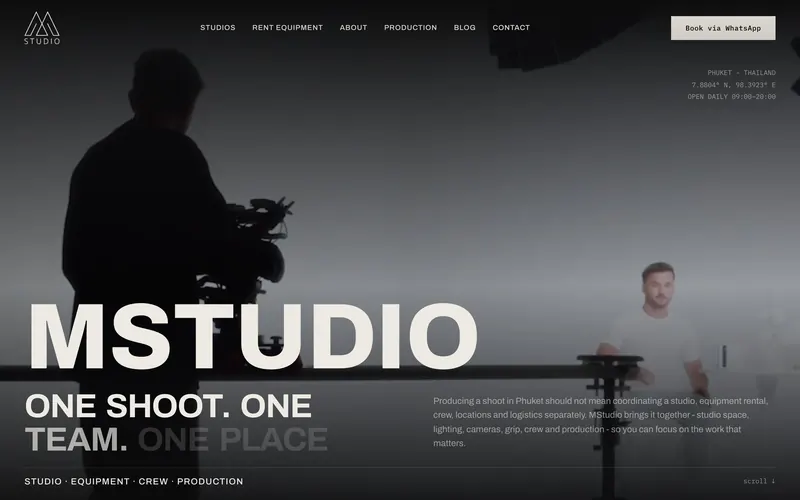
MStudio Asia
- Project
- Photo and video studio, Phuket
- Scope
- Migration from WordPress, design + build
- Result
- 105 old URLs redirected
- Live site
- mstudio.asia
Framer development is building a website in Framer, a visual website builder with a built-in CMS and hosting. Pavlo Zhydkykh builds Framer websites your team edits without a developer: design system, CMS, motion and SEO in one build, from $1,200 and live in 1 to 4 weeks.
Does ChatGPT recommend your website?
Free report in 48 hours · 5 AI engines
Framer development is the work of building a website in Framer: responsive pages, reusable components, CMS collections, motion and SEO settings, published on Framer hosting. The result is a site a marketing team edits in the Framer editor, with no developer needed for texts, images or new CMS items.

“Framer is the fastest way I know to ship a site marketers will actually edit. Code components come in only where native tools stop.”
Why a solo build
Most of a website project is lost between people. Here design and code stay in one pair of hands.
Typical agency
A designer, a developer and an SEO specialist pass the project between each other.
Pavlo Zhydkykh
Design, build, motion and SEO in the same hands, at one fixed price.
Anatomy
Five layers, built together, so the site looks right, loads fast and stays easy to edit.
Every page laid out on a 12-column grid, desktop, tablet and phone.
Buttons, cards and sections as variants your team reuses.
Blog, cases and team as collections marketers publish to.
Scroll and hover animation, light enough for PageSpeed 90+.
Titles, schema, redirects, sitemap and llms.txt.
Timeline
A landing page goes live in about a week, a multi-page site in 2 to 4 weeks. Here is the multi-page path, step by step.
| # | Step | When | What happens | You get |
|---|---|---|---|---|
| 01 | Call and fixed price | Week 1 | A call about goals, pages and content. | A fixed price and timeline in writing |
| 02 | Design: key pages | Weeks 1-2 | Home and key pages designed in Figma first, so the look is agreed before the build. | Figma design of the key pages |
| 03 | Feedback, round 1 | Week 2 | Your comments on the design in one round, applied before the build starts. | An approved design |
| 04 | Build in Framer | Weeks 2-4 | Responsive pages, CMS collections, components and motion, built in Framer. | A working site on a preview link |
| 05 | SEO, schema, content | Week 4 | Titles, meta, schema, sitemap, redirects and llms.txt, plus your final texts. | A site ready for Google and AI search |
| 06 | Feedback, round 2 | Week 4 | A second round on the working site, on desktop and phone. | Final fixes |
| 07 | Launch on your domain | End of week 4 | Domain connected, redirects live, Search Console checked. | A live site, then $30 an hour only when you need it |
Pricing
Pick the project and add what you need. The final price is fixed after the first call, before any work starts.
Built in Framer
Checklist
The checks Pavlo Zhydkykh runs on a Framer build before the domain is connected. Each one takes minutes and is easy to miss.
Set per page in the SEO settings, and per CMS item through variables, so no two pages compete with the same title.
Framer redirects send each old address to the closest new page, so links and rankings carry over from the old site.
The Framer Help Center notes that content inside overlays is not indexed by search engines, so prices and answers belong on the page itself.
Framer resizes images and serves WebP and AVIF, but the resolution setting still decides how heavy the hero image is, and the hero image is often the LCP element.
The Framer Help Center recommends hosting videos on an external platform to keep load times short.
Scroll and hover effects that animate position and opacity stay light; effects that resize the layout cost PageSpeed points on mobile.
Framer generates the sitemap automatically. Submitting the sitemap in Google Search Console after launch shows which pages Google has indexed.
Fit check
Compared
MStudio Asia moved from WordPress and WooCommerce to Framer. Here is what changes for the team that runs a site after a move like that.
| Criterion | WordPress | Framer |
|---|---|---|
| Editing | An admin panel, often with a page builder plugin | A visual editor, plus editing on the live page |
| Updates | Core, theme and plugin updates to install | No plugins to update; Framer maintains the platform |
| Hosting | A separate host, plus caching and security plugins | Included in the Framer site plan |
| SEO setup | Usually an SEO plugin | Titles, meta, sitemap and redirects built in |
| Speed | Depends on the theme and plugins | Pavlo targets PageSpeed 90+ on mobile at launch |
In their words
Word for word, with the source linked: research, official documentation and the people Pavlo Zhydkykh has worked for.
“Framer publishes clean HTML, CSS, and assets for fast, crawlable pages.”
“Redirects are essential when migrating your website to Framer, as they improve user experience and help visitors find the content they need.”
“To provide a good user experience, sites should strive to have Largest Contentful Paint of 2.5 seconds or less.”
“He did an amazing job on my landing page. It perfectly captures what I wanted.”
“It was an absolute pleasure working with Pavlo. The quality of work he delivered was AMAZING.”
“He is amazing in what he contributes, both design-wise and also from the ideas.”
FAQ
Still unsure? Ask your AI about Pavlo Zhydkykh:
A landing page starts at $1,200, a multi-page site at $3,000, and a move from WordPress, Webflow or Wix to Framer at $2,200. The price is fixed after the first call, and two rounds of feedback are included.
A landing page takes 1 to 2 weeks. A multi-page site takes 2 to 4 weeks, depending on the pages and the CMS.
Framer is faster to launch and easier for a marketing team to edit visually. Astro + Sanity fits sites that need top speed, full ownership or custom features. Pavlo builds on both and recommends one after the first call.
Yes, when it is set up properly. Every build ships with titles, meta, schema, a sitemap and llms.txt, and scores PageSpeed 90+ on mobile, so Google and AI assistants like ChatGPT can read the site.
Yes. Every old URL gets a 301 redirect, titles and metadata move over, and Search Console is checked after launch. On MStudio Asia that was 105 old URLs.
Yes. Texts, images, CMS items and new pages from existing sections, all in the Framer editor without a developer. When you need more, Pavlo works at $30 an hour, with no retainer.
About the author
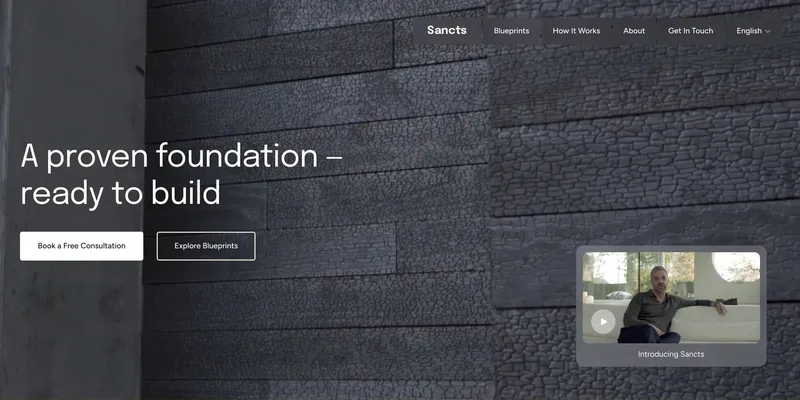
Pavlo Zhydkykh is a web designer and developer in Eastern Europe who has built websites for AI, fintech and B2B startups since 2016, designing and building each project himself on Framer or Astro + Sanity. Clients include MStudio Asia, Silicon Data, Inturai, Accolade Pro, NimbleStax and Sancts.
About Pavlo LinkedInUpworkContra Privacy policy
Page reviewed by Pavlo Zhydkykh · Updated