
The real cost of a Framer website in 2026 - plan pricing, templates, custom builds and hidden fees, broken down by a senior Framer developer.
Written by

How much does a Framer website cost in 2026? Anywhere from nothing to five figures - it depends entirely on how you build it. Below I break down the real numbers: subscription plans, template pricing, custom development rates and the hidden fees most people only discover on their first invoice.
Key takeaways
Framer’s 2026 plans: Free ($0), Basic ($10/month) and Pro ($30/month) billed annually, plus custom-priced Enterprise.
A DIY site costs as little as $120 a year; a professional custom build typically lands between $1,500 and $6,000.
Marketplace templates ($0–$200) are the fastest middle route if your content fits a standard layout.
The real budget risks are the extras - editor seats, localisation and add-ons - not the base subscription.
Framer website cost at a glance
The honest short answer: a Framer website costs anywhere from $0 to $20,000+, and the platform subscription is the smallest part of that number. What you pay depends almost entirely on who builds the site. These are the realistic ranges I quote and see on real projects in 2026:
How you build | Upfront cost | Ongoing cost | Best for |
|---|---|---|---|
DIY on Framer | $0 | $0–$360/year (plan) | Founders with more time than budget |
Marketplace template | $0–$200 | $120–$360/year (plan) | Fast launch on a standard layout |
Freelance Framer developer | $1,500–$6,000 | Plan + occasional updates | Marketing sites that must convert |
Agency or complex build | $6,000–$20,000+ | Plan + retainer | Multi-language, CRO-heavy projects |
For most small businesses, the sweet spot is a custom build from an experienced freelancer on the Pro plan - senior-level design and SEO without agency overhead. The rest of this guide breaks each number down so you can budget precisely.
What a Framer subscription costs in 2026
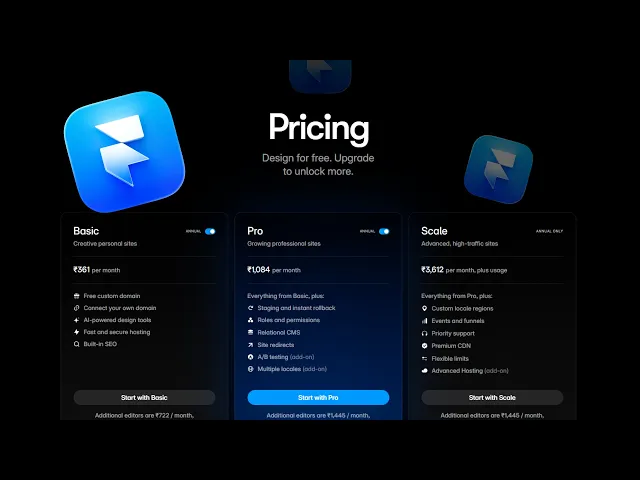
Framer’s own pricing is simple and published openly. All prices below are billed annually; paying month-to-month costs slightly more. If you’re still deciding between platforms, my Framer vs Webflow comparison looks at how the two stack up on total cost of ownership.
Free - $0. The full editor and AI tools, but no custom domain and a “Made in Framer” badge. Fine for testing, not for a business.
Basic - $10/month. Custom domain, 2 CMS collections and 50 GB bandwidth. Enough for a brochure site or simple portfolio.
Pro - $30/month. 10 CMS collections, 100 GB bandwidth, a staging environment and redirects. This is the plan I put most client sites on.
Enterprise - custom pricing with SSO, uptime guarantees and custom limits for larger organisations.
A clear walkthrough of every 2026 Framer plan and who each tier actually suits.
DIY, template or developer: the real cost driver
Labour, not software, decides your budget. Framer is genuinely usable by non-designers, so the DIY route is realistic for a simple site - your only costs are the plan and your evenings. Templates sit in the middle: marketplace templates run from free to around $200, and you can be live in a weekend if your content fits the layout.
The subscription is the cheapest part of a website. Getting it wrong is the expensive part.
A custom build is where the numbers grow - and where the value does too. On real client projects, I’ve found a focused landing page usually lands between $1,500 and $3,000, and a five-to-eight-page marketing site with CMS between $3,000 and $6,000; multi-language or e-commerce builds go well beyond that. If you’re leaning this way, my guide to hiring a Framer developer in 2026 covers rates, red flags and the questions worth asking before you commit.
Hidden Framer costs to budget for
None of these are scandalous, but they surprise people on the first invoice. Check which apply to you before committing to a plan:
Extra editor seats - $20/month per editor on every paid plan; a three-editor team adds $720 a year.
Content editor seats - $10/month for teammates who only edit CMS content.
Localisation - $20/month per additional locale, which adds up quickly on multi-language sites.
A/B testing (Convert) - $50 per 500,000 events if you run experiments.
Advanced hosting - $200/month for rewrites and enterprise-grade routing; most sites never need it.
Your domain - $10–$20 a year from your registrar; Framer doesn’t charge for connecting it.
A solo founder on Basic or Pro typically needs none of these - the headline plan price really is the whole software bill.
How to budget your Framer website in five steps
Define what the site must do - leads, bookings, sales - because a converting page needs more design work than a digital business card.
Count your pages and CMS collections; more than two collections (say, a blog plus projects) pushes you onto the Pro plan.
Pick your route honestly: DIY if you have time and taste, a template if your content fits a standard layout, a developer if the site must earn money.
Add the extras - editor seats, locales and any A/B testing - using the list above.
Reserve 10–15% of the build budget for post-launch tweaks; copy changes, SEO fixes and conversion improvements always come up.
Whatever you spend, protect the investment by making sure people find the site: my Framer SEO guide for 2026 walks through exactly how to rank it once it’s live.
Want a Framer website that’s worth the money?
Pavlo Zhydkykh builds custom Framer websites with an SEO-first foundation - structured data, tuned Core Web Vitals and semantic HTML from day one. Budgets are agreed as fixed quotes, so there are no surprise line items. Get in touch for a clear price on your project.
Related posts
How much does a Framer website cost in total?
Your total is the plan plus the build. A DIY site on Basic costs about $120 a year all-in. A template adds a one-off $0–$200, and a custom build from a freelance developer typically runs $1,500–$6,000 depending on scope.
Can I build a Framer website for free?
Yes. The Free plan includes the full editor and publishes to a framer.website subdomain with a “Made in Framer” badge. It’s fine for testing ideas or a personal experiment, but a business site needs at least the Basic plan for a custom domain.
Which Framer plan should I choose?
Basic ($10/month) suits a brochure site or portfolio with up to 2 CMS collections. Pro ($30/month) is the practical choice once you run a blog plus projects, or want staging and redirects. Enterprise only makes sense when you need SSO, custom limits or uptime guarantees.
How much does it cost to hire a Framer developer?
In my experience, a focused landing page runs $1,500–$3,000 and a full marketing site with CMS runs $3,000–$6,000. Agencies and complex multi-language builds range from $6,000 to $20,000+. Always ask for a fixed quote against a written scope.
Are there hidden costs with Framer?
The ones to know: extra editor seats ($20/month each), content editor seats ($10/month), localisation ($20/month per locale), A/B testing ($50 per 500,000 events) and advanced hosting ($200/month). A solo founder usually needs none of them — but teams should budget for seats.


